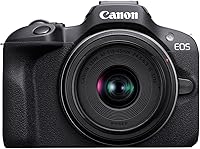
Sony A6400 Review: Worth It? (November 2026)
Our Sony A6400 review recommends this kit for people photos and everyday photography with room to learn and change lenses. Choose the Canon R50 for more auto assistance, or the Nikon Z30 for a setup centered on recording and streaming.
On this page (9 sections)
- Sony A6400 review: what does the kit include?
- How useful are the A6400's autofocus and burst shooting?
- Is the A6400 screen suitable for self-recording?
- What can you record with the Sony A6400?
- Sony A6400 vs Canon R50 vs Nikon Z30: which fits your routine?
- What should you check before buying the A6400?
- How should a beginner set up and use the A6400?
- How do you care for the camera and avoid common mistakes?
- Sony A6400 review verdict: should you buy it?
The Sony A6400 is a useful choice for everyday people photos, especially if you want eye autofocus and a camera system you can grow into. This Sony A6400 review focuses on whether its included lens, screen design and photo features fit your needs better than the Canon R50 or Nikon Z30.
Choose by the pictures you'll make most often. A family photographer, a beginner who wants help with settings and a creator recording at a desk have different reasons to favor each kit.
Sony A6400 review: what does the kit include?
The Sony A6400 kit includes the camera and a 16-50mm lens, giving you a starting setup for people, travel scenes and everyday photography. You can learn with that lens before deciding whether a more specialized one would help.
Sony a6400 Kit (16-50mm): Best for everyday people photos

- Sony E interchangeable lens mount
- 16-50mm kit lens
- Real-Time Eye Auto Focus
- Tilting LCD screen
Choose this kit for everyday people photos and a starting lens you can learn before adding more gear. Its eye autofocus and burst shooting suit buyers who want to practice photographing movement.
Pros
- 16-50mm starter lens included
- Real-Time Eye Auto Focus
- Up to 11 fps continuous shooting
- Compatible Sony E lens options
Cons
- Tilting screen needs careful planning for self-recording
- Starter zoom is not a substitute for a long lens for distant subjects
The box also includes an NP-FW50 rechargeable battery, AC adapter, shoulder strap and micro USB cable. A body cap, accessory shoe cap and eyepiece cup complete the supplied accessories.
The zoom lets you change framing without changing lenses. Use its wider end to include more of a room or landscape, then zoom in for a tighter composition when you can't move closer.
It won't replace a long lens for a bird across a field or a player on the far side of a sports ground. Think about your usual distance from your subject before expecting one starter lens to cover every outing.
If the terms are new, read what a kit lens is. For most first-camera buyers, whether a kit lens is good enough depends more on subjects and light than on buying extra gear immediately.
Sony A6400 review: who should buy this kit?
Buy this kit if you want to learn people photography and capture everyday activity while keeping the option to change lenses later. The Sony E mount gives you a path to compatible lenses as your needs become clearer.
Skip it if your main reason for buying a camera is a guided automatic experience or a dedicated streaming setup. The Canon and Nikon alternatives below have features more directly tied to those needs.
How useful are the A6400's autofocus and burst shooting?
The A6400 combines Real-Time Eye Auto Focus with burst shooting up to 11 fps, which makes it worth considering for people and moving subjects. Eye focus helps target the person, while a burst gives you several moments to choose from.
Its autofocus system uses 425 phase detection points and 425 contrast detection points across 84% of the sensor. For buying purposes, the more useful question is how you'll select and follow your subject.
For a portrait, decide whose face should be sharp before you press the shutter. In a group, people standing at different distances may need more depth of field than a single-person portrait.
For movement, use a continuous focus mode and choose a shutter speed that matches the action. A burst can capture several expressions or positions, but it can't correct motion blur caused by a slow shutter.
Short bursts are usually easier to manage than holding the shutter down through an entire scene. Start just before the moment you expect, then pause and check whether your focus and exposure need adjustment.
Don't choose solely by the fastest burst figure. For family photos, a clear face, a clean background and good timing matter more than filling a card with near-identical frames.
Is the A6400 screen suitable for self-recording?
The A6400's tilting LCD can help with high and low shooting angles, but buyers who regularly face the lens should plan their screen position carefully. The Canon R50 has a vari-angle touchscreen, and the Nikon Z30 has a flip-out touchscreen.
For still photos, changing the screen angle can help you compose closer to a child's height or keep the camera low for a foreground detail. That can improve the viewpoint without requiring you to hold the camera at eye level.
For self-recording, picture the whole setup before choosing. The display needs to remain visible around the camera support, cables and any accessories you intend to add.
Also think about where you'll stand. A screen helps you check framing before a clip, but looking at it throughout a recording can draw your gaze away from the lens.
If screen movement is a deciding factor, compare the actual positions you need for a desk, tripod or handheld setup. A useful screen is one you can see from your recording position.
What can you record with the Sony A6400?
The Sony A6400 supports 4K video plus time-lapse and slow or quick motion movie functions. Those motion options let you create certain effects without a separate editing step.
Choose a recording mode for the result you want. Normal-speed clips suit conversations and family events, while time-lapse can show a slow change such as clouds moving or a workspace taking shape.
Slow motion needs a clear subject and deliberate movement. A short clip of a single action is often easier to use than a long recording without a planned beginning or end.
For a simple talking clip, arrange the light and camera position before changing settings. Face a window where practical, avoid a bright window directly behind you and keep the background free of distractions.
Record a brief sample and play it back before committing to a long session. Check focus, framing and sound, since a sharp picture alone doesn't make a useful tutorial or family recording.
The Nikon Z30 kit deserves attention if streaming is the main purpose. The Canon R50 review covers another option for buyers who want automatic help alongside photo and video controls.
Sony A6400 vs Canon R50 vs Nikon Z30: which fits your routine?
Choose the Sony for learning people photography, Canon for guided everyday use, or Nikon for a creator setup. Their differences are easier to judge by routine than by comparing isolated numbers.
| Camera kit | Lens included | Screen | Main buying reason |
|---|---|---|---|
| Sony a6400 Kit (16-50mm) | 16-50mm | Tilting LCD | People photos and a flexible starting system |
| Canon EOS R50 Kit (RF-S 18-45mm) | RF-S 18-45mm | Vari-angle touchscreen | Auto assistance and subject detection |
| Nikon Z30 With Wide-Angle Zoom | 16-50mm | Flip-out touchscreen | Self-recording, webcam use and streaming |
Choose the Canon R50 for help with settings
The R50 suits a beginner who wants automatic scene assistance and touch controls while learning. It pairs a 24.2 MP APS-C sensor with subject detection for people, animals and vehicles.
Advanced A+ assistance provides automatic options for scenes such as backlit or night subjects. That makes it a sensible alternative if you want to start taking pictures now and learn manual choices gradually.
Its video options include 6K oversampled uncropped 4K at up to 30 fps. Burst shooting reaches 12 fps with the electronic first curtain shutter or 15 fps with the electronic shutter.
Skip the R50 if your main requirement is the Nikon's specific streaming connections. For a closer photo-focused comparison, read Canon R50 vs Sony A6400.
Choose the Nikon Z30 for a desk or tutorial setup
The Z30 suits creators who want self-framing and direct computer connections. It includes a stereo microphone with adjustable sensitivity, a red recording light and phone-based remote control.
USB-C supports webcam operation, Full HD 60p streaming and constant power. Streaming at 4K 30p uses HDMI, so choose your connection based on the output your setup needs.
Its included zoom has lens stabilization, and autofocus includes eye tracking for people and pets. Compatible NIKKOR Z lenses give you options for changing the view later.
Skip the Z30 if streaming and self-recording are minor interests and guided still-photo use matters more. The R50 review explains the Canon alternative in more detail.
What should you check before buying the A6400?
Check lens needs, kit contents and your whole starting budget before choosing. Confirm the exact bundle once, since this review covers the camera with the included zoom.
Budget for a compatible memory card, a protective bag and a practical way to back up photos. Check card requirements in the camera manual, especially for the video mode you plan to use.
Think beyond the body when choosing a lens system. A compatible mount is the starting point; lens size, focal length and the subjects you want to photograph should guide later additions.
Avoid buying several lenses before you know what the starter zoom can't do for you. Repeated difficulty with distant subjects, tight indoor spaces or low light gives you a more useful upgrade reason than a general wish for better pictures.
Our guide to how to choose a beginner mirrorless camera explains those tradeoffs. You can also browse beginner mirrorless cameras before settling on a system.
How should a beginner set up and use the A6400?
Start with a simple photo setup and one subject, then learn one control at a time. A quiet practice session makes focus and exposure choices easier to understand than a busy event.
- Charge the battery and attach the strap before taking the camera outside.
- Insert a compatible memory card and format it in the camera after saving any files you need.
- Set the date and time so your photos sort correctly.
- Begin with automatic exposure while you learn framing and focus selection.
- Choose the intended subject, take a few photos and inspect them at a larger size.
- Practice changing shutter speed or aperture once you can identify what you want to improve.
For people, focus on the face rather than a bright object behind it. Check the result before moving on, particularly if several people are in the frame.
For action, start with enough light to use a faster shutter speed. Raising ISO may be more useful than keeping it low while every moving subject turns blurry.
For a still scene, slow down and inspect the frame edges. A distracting bag, cut-off hand or tilted horizon can matter more than a small change in exposure.
Keep your early setup repeatable. The guide to whether the Sony A6400 is good for beginners can help you decide how much learning you want from a first camera.
How do you care for the camera and avoid common mistakes?
Protect the lens surfaces, mount and camera from dirt and moisture, and back up your photos after each outing. Careful habits are easier than dealing with damage or lost files later.
Use a clean blower to remove loose dust before gently wiping the lens with a suitable lens cloth. Don't rub grit across the glass or use household cleaners.
Change lenses in a sheltered place, keep the opening pointed down and replace caps promptly. Avoid touching the sensor or reaching inside with a cloth.
After moving from a cold place into warm, humid air, allow the camera to adjust before opening the bag. For packing and carrying advice, read how to travel with a camera.
Don't erase the card as soon as files appear on a computer. Keep a second copy somewhere separate before formatting the card for another outing.
The most common buying mistake is expecting a new body to solve every photo problem. Poor light, an unsuitable shooting distance and a slow shutter each need a different response.
Another mistake is treating the widest aperture as the right choice for every portrait. Groups may need more depth of field, especially when faces aren't on the same plane.
Sony A6400 review verdict: should you buy it?
Buy the Sony A6400 kit for everyday people photos and room to learn, provided its screen layout fits how you'll shoot. Start with the included lens and let actual photo needs guide your next addition.
Choose the Canon R50 if guided automatic features and touch controls will help you take the camera out more often. Choose the Nikon Z30 if your main goal is a repeatable recording or streaming setup.
The decision from this Sony A6400 review is to choose the workflow you'll use each week. Continue with Canon R50 vs Sony A6400 for that final comparison, or what a mirrorless camera is if you're still choosing a camera type.
Frequently asked questions
Is the Sony A6400 good for beginners?
The Sony A6400 suits beginners who want to learn photography with an interchangeable-lens camera. Start with the included zoom and practice focus, shutter speed and framing before buying another lens.
Choose the Canon R50 instead if auto assistance and touch controls are higher priorities.
Does the Sony A6400 have a flip-out screen?
The Sony A6400 has a tilting LCD, so consider how you'll see it while facing the lens. Plan space for any accessories before building a self-recording setup.
Compare the Canon R50's vari-angle touchscreen and the Nikon Z30's flip-out touchscreen if screen movement is central to your choice.
Is the Sony A6400 good for video?
The Sony A6400 supports 4K video and includes time-lapse and slow or quick motion movie functions. It suits buyers who want video alongside still photos.
For a desk-based creator setup, compare the Nikon Z30's webcam operation, microphone controls and streaming connections before deciding which workflow fits.
What lens comes with the Sony A6400 kit?
This Sony A6400 kit includes a 16-50mm lens for everyday scenes, people and travel photos. Start with that range to learn which views you use most.
Distant subjects may call for another lens later; what a kit lens is explains the role of a starter zoom.