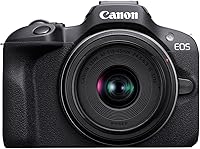
Canon R50 vs Sony A6400: Which Is Better? (November 2026)
In the Canon R50 vs Sony A6400 comparison, choose the R50 for beginner photo and video use with flexible framing and automatic subject detection. Choose the A6400 if you already have compatible Sony E mount lenses or want to build around that mount.
On this page (11 sections)
- Canon R50 vs Sony A6400: what is the main difference?
- Which camera has the better screen for photos and video?
- Which camera is better for video?
- How do autofocus and burst shooting compare?
- What do the kit lenses mean for your choice?
- Which camera should beginners buy or skip?
- Which kit fits family photos, travel and indoor use?
- How should you set up either camera on the first day?
- What common mistakes should you avoid?
- How do you care for either camera and its lenses?
- Which should you choose, the Canon R50 or Sony A6400?
Choose the Canon R50 for a first camera that covers photos and self-recorded video; choose the Sony A6400 if compatible Sony lenses already shape your plans. The Canon R50 vs Sony A6400 decision is mainly about screen movement, focus tools and the lens system you'll keep using.
Both are APS-C mirrorless cameras offered here with starter zoom lenses. Begin with the subjects you photograph most, then choose the kit that helps you frame and capture them without buying accessories you don't yet need.


Canon R50 vs Sony A6400: what is the main difference?
The R50 favors flexible framing and automatic subject detection, while the A6400 gives buyers a starting point in Sony E mount. For someone starting without lenses, the Canon is our stronger general recommendation.
The R50 combines a 24.2 MP APS-C sensor with a DIGIC X processor. The Sony also uses an APS-C sensor, so sensor format alone won't settle this choice.
Think about your next 3 uses: perhaps a birthday indoors, a weekend walk and a short video at a desk. A camera that fits those situations is more useful than one chosen for a feature you'll rarely touch.
Existing equipment can change the recommendation. A compatible lens you enjoy using may be a better reason to choose a body than a small difference in maximum burst speed.
Which camera has the better screen for photos and video?
Choose the Canon's vari-angle touchscreen for changing camera positions, or the Sony's tilting LCD if that movement covers your usual framing. Screen design matters most when the camera isn't held directly in front of your face.
For low-angle pet photos, a movable screen lets you lower the camera without lying on the ground. For overhead shots, check that you can still see the frame while keeping a secure grip.
The R50 also has a 2.36-million-dot electronic viewfinder. A viewfinder gives you another way to compose, including situations where viewing a rear screen is awkward.
If you can handle both cameras before buying, move the screens through the positions you'll actually use. Also check whether the grip stays comfortable while you reach the controls.
Canon R50 vs Sony A6400 for self-recording
The R50 is our pick for frequent self-recording because its screen design gives you more framing options. The A6400's screen also supports vlogging, but its movement follows a different path.
Picture your complete setup, including a tripod and any microphone you plan to add. Make sure you can see the screen without an accessory blocking it, and check accessory compatibility before buying.
Which camera is better for video?
The R50 is the clearer choice for specific recording formats: it offers 6K oversampled, uncropped 4K up to 30 fps and Full HD up to 120 fps. The A6400 records 4K and offers time lapse and slow or quick motion modes without post-processing.
Uncropped recording helps you retain the lens's framing in that mode. That matters when you're working in a small room and can't move the camera farther from yourself.
Canon's Movie for Close-up Demo Mode switches focus to the closest subject. It suits demonstrations where you bring an item toward the camera, but that behavior may be distracting if your face should remain the main subject.
Use that mode for a deliberate demonstration, rather than leaving it on for every clip. Keep unrelated objects away from the foreground so they don't compete with what you're showing.
Before choosing either camera for long recordings, confirm its recording limits, power options and audio connections for your setup. Those details matter more for an interview or lesson than for a few short family clips.
How do autofocus and burst shooting compare?
The Canon offers broader named subject categories, while the Sony offers Real-Time Eye Auto Focus. Choose the focus behavior that matches your subjects rather than adding up autofocus points.
The R50's Dual Pixel CMOS AF II has 651 AF zones, with detection and tracking for people, animals and vehicles. Sony provides 425 phase detection and 425 contrast detection points over 84% of the sensor.
Those figures describe different measures. A larger total doesn't tell you which camera will keep your chosen subject sharp in every scene.
For bursts, the Canon reaches up to 12 fps with electronic first-curtain shutter or 15 fps with electronic shutter. The Sony reaches up to 11 fps.
Use short bursts for a jump, a laugh or a pet changing direction. Starting just before the moment is more useful than holding the shutter down throughout an entire activity.
Fast shooting still needs a shutter speed that suits the movement. For family use, our guide to choosing a camera for family photos explains how handling and lens needs affect the decision.
What do the kit lenses mean for your choice?
The Canon kit includes an RF-S 18-45mm F4.5-6.3 IS STM lens, while the Sony kit includes a 16-50mm lens. These zooms give you a way to learn framing before choosing a more specialized lens.
The Sony's range starts a little wider and ends a little longer. Both ranges suit learning how focal length changes the amount of a scene you include.
Use the wider end for a room or a group, then zoom toward the longer end for a tighter view. Watch the edges when photographing groups so faces aren't pressed against the frame.
Canon RF and Sony E are different mounts, so lenses aren't a direct swap between these bodies. Check the exact mount before buying, even when the lens carries the same brand name as your camera.
Read what a kit lens is if you're new to interchangeable lenses. Our guide to whether a kit lens is good enough can help you decide when an upgrade solves a real problem.
For Canon buyers with a clear need, such as a different view or more background blur, see the best lenses for the Canon R50.
Which camera should beginners buy or skip?
The R50 suits beginners who want automatic help while learning, while the A6400 suits beginners with a clear reason to choose Sony lenses. Starting with the Canon is sensible when you have no equipment tying you to either system.
The R50 includes Advanced A+ Assist and auto-compatible scenes. Canon describes these as helping with difficult situations such as night scenes and backlighting.
Use automatic modes to capture the moment, then learn one control at a time. You don't need to master manual exposure before making worthwhile family or travel photos.
Skip the R50 if using your existing Sony lenses directly is a priority. Skip the A6400 if your main reason for shopping is the Canon's screen design or close-up demonstration mode.
Skip both if you want a camera with a permanently attached lens and no lens decisions. These kits make sense when you want the option to change lenses as your needs develop.
Read whether the Sony A6400 is good for beginners for that camera's role as a first kit. Our guide to choosing a beginner mirrorless camera helps you weigh the broader tradeoffs.
Which kit fits family photos, travel and indoor use?
Choose the Canon for a mix of people, pets and self-recorded clips; choose the Sony when its lens system fits your plans. For travel, favor the complete kit you're willing to carry all day.
For family photos, practice selecting your intended subject when several people share the frame. Automatic detection still needs you to decide whose expression matters most.
Indoors, start by moving your subject toward a window or another useful light source. A camera's automatic mode can't prevent every blurred photo when a moving subject is poorly lit.
The Canon kit lens's maximum aperture varies from f/4.5 to f/6.3. In dim rooms, that makes learning shutter speed and ISO more useful than assuming the bundled lens will handle every situation.
For travel, leave room in the bag for basic protection and essential supplies. Carrying extra lenses without a specific purpose can make you less willing to take the camera out.
Keep the camera accessible during a walk, but put it away when conditions threaten the gear. A smaller set of familiar equipment is easier to manage than several accessories you haven't learned to use.
How should you set up either camera on the first day?
Start with reliable focus, simple file settings and a secure strap. Learn how to make and find a sharp photo before changing lots of menu options.
Charge the battery, attach the lens carefully and fit a compatible memory card. Back up any files already on the card before formatting it in the camera.
For an easy first workflow, use JPEG and an automatic exposure mode. If you want more editing flexibility, learn what RAW files require before committing every photo to that workflow.
Practice these tasks before taking the camera to an important event:
- Select the person or object you want in focus.
- Review a photo at a larger view to check sharpness.
- Change between single shots and a short burst.
- Start a video, stop it and play it back.
- Find the battery and remaining card space indicators.
The R50 supports Bluetooth and Wi-Fi, with Canon Camera Connect for compatible smart devices. Pair the camera at home so transferring a photo isn't another task to learn during an outing.
Canon buyers can follow how to use the Canon R50 as a beginner for a more focused starting routine. Keep the first outing simple enough to notice which settings you actually need.
What common mistakes should you avoid?
Avoid changing several settings at once when a photo goes wrong. First decide whether the problem is missed focus, subject movement, camera movement or exposure.
A sharp background with a soft face suggests the camera focused somewhere else. Motion blur needs a different response, often a faster shutter speed or more light.
For moving children or pets, try a shutter speed around 1/500 second as a starting point. Adjust for the speed of the subject and available light, and let ISO rise when a sharp moment matters more than a cleaner file.
Don't expect burst mode to solve poor timing or a shutter speed that's too slow. Review a few frames after the first attempt so you can correct the cause.
For video, avoid changing resolution and frame rate halfway through a project without a reason. Consistent settings make clips easier to combine, while extra frames create larger files and more material to sort.
Leave the electronic shutter's maximum speed for situations where it helps. Across this camera category, fast movement and some artificial lighting can cause distortion or banding, so inspect a short sequence first.
How do you care for either camera and its lenses?
Protect lens surfaces, the mount opening and stored files with a few habits. Good care reduces avoidable damage without requiring a bag full of cleaning tools.
Turn the camera off before changing lenses, and work away from wind or blowing dust. Keep the body opening pointed down and have the next lens or body cap ready.
Remove loose grit with a blower before wiping glass. Use a clean lens cloth for marks, and avoid rubbing sand or dust across the surface.
Keep caps on equipment stored in a bag, and don't assume either camera is protected from rain. When moving cold gear into a warm room, letting it warm gradually inside a closed bag can help limit condensation.
Copy important photos to another location after an outing. Confirm the copies open before erasing the card, especially after an event you can't repeat.
Which should you choose, the Canon R50 or Sony A6400?
For the Canon R50 vs Sony A6400 decision, choose the system that fits your next year of photos, including the lenses you'll use. The strongest reason to choose the Sony is an existing or planned compatible lens kit.
If you're starting fresh, pick the R50 for a mix of family photos, beginner learning and self-recorded video. Pick the A6400 when Sony lenses and its screen movement meet your needs.
Before ordering, name one task the kit must handle and one limit you're willing to accept. That keeps the choice tied to your photography instead of a feature you might never use.
Read the Canon R50 review for a closer look at our default beginner choice, or the Sony A6400 review if you're leaning toward Sony.
Frequently asked questions
Is the Canon R50 better than the Sony A6400?
The Canon R50 is the better starting point for beginners who want flexible screen positioning, automatic subject detection and clear video options. The Sony A6400 makes more sense if you already have compatible Sony E mount lenses or have chosen specific lenses in that system.
Which camera has better autofocus, the Canon R50 or Sony A6400?
Choose by focus features rather than point counts: the R50 detects and tracks people, animals and vehicles, while the A6400 offers Real-Time Eye Auto Focus. For family portraits, eye focus is useful; for a mix of people, pets and vehicles, the Canon's subject options are a clear reason to choose it.
Which camera is better for video?
The R50 is the clearer choice if you want uncropped 4K up to 30 fps, Full HD up to 120 fps and flexible screen positioning. The A6400 records 4K and offers time lapse and slow or quick motion modes, which suit buyers who want those recording options.
Can I use the same lenses on the R50 and A6400?
No, the lenses are not directly interchangeable between these mounts: the R50 uses Canon RF mount, while the A6400 uses Sony E mount. Before buying either body, check the exact mount and compatibility of any lenses you own, including lenses you might otherwise assume fit because they share the brand.
Which camera is easier for a beginner?
The R50 is the stronger beginner recommendation if you want automatic shooting help and a touchscreen for composing photos and video; the A6400 remains a sensible starting point for someone committed to Sony lenses. Handle both if possible, checking grip comfort and whether you can reach the controls easily.