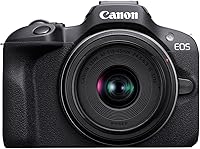
How to Choose a Beginner Mirrorless Camera
The right mirrorless camera for beginners pairs useful autofocus with a lens and controls that suit your subjects. Choose the Canon R50 for mixed photo and video use, the R100 for a compact start, the Sony a6400 for Sony E lenses, or the Nikon Z30 for video and streaming.
On this page (11 sections)
- How do you choose a mirrorless camera for beginners?
- Which camera features matter most at the start?
- What lens should you start with?
- Which beginner mirrorless camera fits your priorities?
- How much should you budget beyond the camera?
- Should you choose a mirrorless camera or a compact camera?
- How should you set up your first mirrorless camera?
- How can beginners get sharper photos and better video?
- Which beginner camera mistakes should you avoid?
- How do you care for a mirrorless camera?
- Which mirrorless camera for beginners should you choose?
The right mirrorless camera for beginners makes your usual subjects easier to photograph and gives you room to learn. The Canon R50 is the strongest fit here for mixed photo and video use, while the R100, Sony a6400 and Nikon Z30 serve more specific priorities.
Start with a camera and kit lens rather than a bag of accessories. Our best beginner cameras for family photos and travel guide helps if those are your main uses.
How do you choose a mirrorless camera for beginners?
Choose around what you shoot, how you compose and which lens you need. Those choices matter more than buying the body with the longest feature list.
Write down 3 situations you expect to photograph often, such as children indoors, daytime sightseeing or talking to the camera. Each points toward different needs.
Moving children call for subject tracking and a suitable shutter speed. Sightseeing rewards a manageable kit, while self-recording needs a screen you can see from in front of the lens.
Narrow your options in this order:
- Choose your main use: still photos, video or a regular mix.
- Check that the included lens covers your usual scenes.
- Match autofocus features to people, pets or other subjects.
- Decide how you want to frame shots, including eye-level and low-angle use.
- Consider the lenses you might add later.
- Compare the full kit and essential accessories against your budget.
If possible, handle the camera with its lens attached. Check whether your fingers reach the main controls without shifting your grip.
Read what a mirrorless camera is if interchangeable lenses are new to you. Our guide to whether mirrorless cameras are good for beginners explains the learning commitment.
Which camera features matter most at the start?
Prioritize focus, framing and controls before small differences in resolution. A sharp photo taken at the right moment is more useful than extra detail in a missed shot.
| Feature | Why it matters | What to check |
|---|---|---|
| Subject detection | Helps place focus on the person or animal you want | Which subjects the camera recognizes |
| Focus tracking | Helps follow a subject as it moves | How to select and follow your intended subject |
| Screen movement | Changes how easily you compose | Fixed, tilting or vari-angle movement |
| Viewfinder | Gives you an eye-level way to frame | Whether it suits your stance and shooting conditions |
| Video modes | Affect detail, motion and framing | Resolution, frame rate and any crop |
| Lens mount | Shapes future lens choices | Compatibility with lenses you expect to use |
| Controls and grip | Affect everyday handling | Access to exposure, focus and playback controls |
More autofocus points do not automatically mean better results. Subject recognition, focus settings and keeping the subject in frame also matter.
Burst shooting gives you several frames from a short moment, but it cannot replace good timing. Long bursts also create more files to sort.
For video, look beyond the word “4K.” A crop narrows your view, and frame rate affects how motion looks and whether footage can be slowed during editing.
What lens should you start with?
Start with the included zoom lens for everyday photos and learning. It lets you explore different framing choices before committing to a more specialized lens.
Use the wide end for rooms, groups and scenery. Zoom toward the longer end for tighter framing of people or details.
A short kit zoom will not make distant wildlife fill the frame. Indoors, it may also require higher ISO or slower shutter speeds as available light falls.
Those limits help you identify a useful upgrade. More reach, a wider view and a larger maximum aperture solve different problems, so choose the one that matches your repeated difficulty.
Learn what a kit lens is if the lens names are unfamiliar. For upgrade decisions, see whether a kit lens is good enough.
Which beginner mirrorless camera fits your priorities?
Choose the R50 for mixed use, the R100 for a compact start, the a6400 for a Sony E-mount path, or the Z30 for creator-focused work. Each makes sense for a different reason.
Canon EOS R100 Kit (RF-S 18-45mm): a beginner mirrorless camera for everyday photos
The R100 suits someone who mainly wants family pictures, travel scenes and a compact interchangeable-lens camera. Its 24.1-megapixel APS-C sensor and human face and eye detection give it a useful foundation for learning still photography.
The included lens has optical image stabilization. That can reduce blur from your hands moving, but it does not freeze a child turning their head or a pet running.
The main handling trade-off is the fixed rear screen. Low-angle pictures and shots above a crowd require more awkward positioning than they do with a movable screen.
For occasional clips, it records Full HD at up to 60 frames per second. Its 4K mode uses the central sensor area at up to 24 frames per second, which narrows the view.
Choose it if still photos lead your plans and you are comfortable composing with a fixed screen. Skip it if self-recording or flexible video framing is a central reason for buying.
Canon EOS R50 Kit (RF-S 18-45mm): for family photos and mixed video use
The R50 suits beginners who expect to photograph moving family members, pets and everyday life while also making video. Its autofocus recognizes and tracks people, animals and vehicles.
A vari-angle touchscreen and electronic viewfinder give you different ways to compose. You can frame at eye level, work near the ground or turn the screen toward yourself.
Its 24.2-megapixel APS-C sensor is not the main reason to choose it over the R100. The more useful differences are its tracking, screen movement and video options.
It records uncropped 4K at up to 30 frames per second using 6K oversampling, plus Full HD at up to 120 frames per second. Those options suit a beginner who wants to explore both regular clips and slow-motion work.
Choose it when your interests are broad and you want room to explore. Skip the step up if you mainly take still subjects in good light and would leave its tracking and video tools unused.
Sony a6400 Kit (16-50mm): for a planned Sony E-mount setup
The a6400 suits beginners who want to build around Sony E-mount lenses. Start with the included zoom, then choose another compatible lens when your interests become clear.
It combines an APS-C sensor, eye autofocus and continuous shooting at up to 11 frames per second. Short bursts can help capture changing expressions, though selecting focus and shutter speed still matters.
The camera also records 4K video and has a tilting LCD. Consider the screen’s movement against the angles you expect to use, especially if you often place the camera on a tripod.
Choose it if Sony lens compatibility is a real part of your plan, such as sharing compatible lenses within a household. That is a clearer buying reason than comparing autofocus point totals.
Skip it if you have no system preference and prefer another camera’s controls or screen movement. A future lens plan should support your photography, not outweigh comfort with the camera you will use now.
Nikon Z30 With Wide-Angle Zoom: for video, tutorials and streaming
The Z30 suits beginners whose main goal is recording themselves or streaming. Its flip-out touchscreen lets you check your position without standing behind the camera.
Eye tracking covers people and pets, while the built-in stereo microphone has adjustable sensitivity. A red recording light provides another useful cue when you are in front of the lens.
It supports Full HD 60p streaming over USB-C, 4K 30p streaming over HDMI and constant power over USB-C. Check your computer, software and connection needs before planning a streaming setup.
The included zoom lens has vibration reduction, which helps with camera shake. For a stationary tutorial or long recording, steady support still gives you more consistent framing.
Choose it for demonstrations, talking-to-camera clips and a planned streaming setup. If still photography is your main interest, compare handling and composition preferences before letting creator features drive the decision.
How much should you budget beyond the camera?
Budget for a working kit, including a suitable memory card and basic protection. Avoid buying a large accessory bundle before you know what each item will do.
Check card requirements in the camera manual, especially for your intended video mode. Capacity determines how much you can store, while write performance matters for recording and bursts.
A secure strap and a padded bag or insert help protect the camera during normal outings. A spare battery becomes more useful when you spend long days away from charging.
For video, choose accessories around the recording space. A tripod can solve shaky framing, while moving closer to the microphone may improve speech before you buy more audio gear.
Include future lenses in your comparison if you already know you need one. A body that fits your budget can lead to an unsuitable setup if the required lens does not.
Should you choose a mirrorless camera or a compact camera?
Choose mirrorless for interchangeable lenses and more control over your setup. Choose a compact camera if keeping the lens attached and packing fewer parts better matches your habits.
Changing lenses adds flexibility, but it also adds decisions. You need to check compatibility, carry the lens you need and protect the camera when swapping lenses.
Think about what your phone already does well. Name the result you want from a separate camera, such as framing through a viewfinder, choosing a specialist lens or learning exposure control.
If you cannot name that goal yet, spend more time identifying which photos feel limited. That will give you a better buying brief than choosing a camera because it looks more advanced.
How should you set up your first mirrorless camera?
Start with automatic exposure, a clear focus setup and a simple file format. Learn where the key controls are before changing several settings at once.
Work through this first-day checklist:
- Charge the battery and attach the strap securely.
- Fit a compatible memory card.
- Copy off anything you need before formatting the card in the camera.
- Set the date and time so your files sort correctly.
- Choose JPEG for easy sharing, or RAW plus JPEG if you plan to learn editing.
- Enable face or eye detection for people when available.
- Take a short series of photos and inspect them in playback.
Use single autofocus for still subjects and continuous autofocus for moving subjects. Names vary by brand, so find the relevant options in the manual.
Begin in auto or program mode, then try aperture priority when you want more control over background blur. Move to shutter priority when subject movement becomes the main problem.
For an R50-specific starting point, follow how to use the Canon R50 as a beginner. Learn one setting at a time so you can see what changed the result.
How can beginners get sharper photos and better video?
Use enough shutter speed for movement, steady support and suitable light. Autofocus helps place sharpness, but it cannot correct every cause of blur.
For moving people, around 1/250 second can be a starting point. Faster action may need a faster shutter, so review the image and adjust rather than treating one setting as a rule.
If the subject is blurred but the background looks sharp, movement may be the problem. If nothing looks sharp, check camera movement and where focus landed.
Do not force ISO to its lowest setting indoors. A higher ISO can be a sensible trade when it lets you use a shutter speed that keeps your subject sharp.
For video, begin with short, stationary clips in good light. Review speech, background noise, focus and framing before recording a long section.
Place a speaker near a window with light falling toward their face. Avoid a bright window directly behind them unless you know how to adjust exposure for that scene.
Which beginner camera mistakes should you avoid?
Avoid changing equipment before identifying the problem. Blur, poor framing and dull light often call for a different technique rather than another body.
Common mistakes include:
- Expecting stabilization to stop subject motion. It helps with camera shake; a moving subject still needs a suitable shutter speed.
- Leaving focus selection entirely to chance. Check that the camera is following your intended person when several faces are visible.
- Using long bursts for every scene. Take short sequences around the moment you want, then review your timing.
- Buying a lens without checking the mount. Similar focal lengths do not make lenses interchangeable across systems.
- Judging only the rear screen preview. Enlarge important pictures to check focus and movement blur.
- Buying several lenses immediately. Learn where the kit zoom falls short before adding another.
Also watch the background before pressing the shutter. Moving a step sideways can remove a distracting object without changing any camera setting.
How do you care for a mirrorless camera?
Keep dust, moisture and rough handling away from the body and lens. A few simple habits protect the kit without adding much work.
Turn the camera off before changing lenses, and choose a sheltered place away from blowing sand or dust. Keep the body opening pointed downward and fit the next lens promptly.
Remove loose grit with a suitable blower before wiping glass. Use lens-safe materials, and avoid rubbing a dirty lens with clothing.
Do not touch the sensor. If a mark keeps appearing in the same place across photos, follow the camera manual’s cleaning guidance or seek professional service.
Let a damp camera dry before closing it inside a bag. Keep caps available, and copy important photos to a second location before clearing the memory card.
Which mirrorless camera for beginners should you choose?
Choose the Canon R50 if family photos, subject tracking and video all matter. Choose the Canon R100 if you want a compact entry point and can work comfortably with its fixed screen.
Choose the Sony a6400 when Sony E-mount lenses are part of a clear plan. Choose the Nikon Z30 when self-recording, tutorials and streaming lead your needs.
Before ordering a mirrorless camera for beginners, name your main subject, confirm the kit lens and decide how you will compose. Those decisions will serve you longer than a feature you rarely use.
If carrying interchangeable lenses still feels like the wrong fit, compare mirrorless cameras and point-and-shoot cameras before committing.
Frequently asked questions
What should a beginner look for in a mirrorless camera?
Prioritize a useful kit lens, autofocus that recognizes your subjects, and controls you can reach comfortably; check screen movement if you film yourself or shoot from low angles. Choose around your main use, then leave room in your budget for a suitable memory card and basic protection.
Is a kit lens enough for a beginner?
A kit lens is enough to learn framing and exposure with everyday scenes, family photos and travel. Use it until you can name a repeated limit, such as distant subjects appearing too small or indoor movement looking blurred; that experience gives you a clear reason to choose another lens.
Should beginners choose a camera with a viewfinder?
Choose a viewfinder if you like composing at eye level or struggle to see screens in bright light; holding the camera against your face can also help steady your stance. For self-recording and unusual angles, screen movement may matter more, so consider both ways of composing before buying.
Is a mirrorless camera good for video beginners?
A mirrorless camera can suit video beginners when its screen, autofocus and recording modes match their plans; a forward-facing screen helps with self-recording, while microphone controls matter for speech. Start with short clips and steady support, then review focus, sound and framing before recording a longer piece.