Are Mirrorless Cameras Good for Beginners?
Yes, mirrorless cameras are good for beginners who want automatic help and room to learn. Start with one kit lens, choose features for your main subjects, and practice focus before buying more gear.
On this page (8 sections)
- Are mirrorless cameras good for beginners starting from a phone?
- Which features make a first camera easier to use?
- Which of these mirrorless kits should a beginner choose?
- Is a kit lens enough for a beginner?
- How should beginners set up a mirrorless camera?
- What should you learn first, and which mistakes should you avoid?
- How do you care for a beginner mirrorless kit?
- Are mirrorless cameras good for beginners who want to grow?
Yes, mirrorless cameras are good for beginners who want automatic help today and more control as they learn. Start with a camera and kit zoom that suit your main subjects, rather than choosing by megapixels or the longest feature list.
The trade-off is a new routine: carrying a separate device, charging it, and moving photos to your phone or computer. If you're willing to do that, you can learn in automatic mode without mastering every menu first.
Are mirrorless cameras good for beginners starting from a phone?
Yes, if you want to learn focus, exposure, and lens choices. A mirrorless camera gives you dedicated controls and interchangeable lenses, but buying one won't improve your framing or timing by itself.
An electronic viewfinder or rear screen can preview brightness changes before you take a picture. Preview behavior varies with the camera and settings, so use it as a guide and review important shots.
You can begin in automatic mode and take control only when a photo needs something different. Manual mode is a tool to learn later, not an entry requirement.
For a broader view of starter options, see our best beginner cameras for family photos and travel. Our explanation of what a mirrorless camera is covers the basic design.
Which features make a first camera easier to use?
Put screen design, subject focus, and comfortable controls ahead of small resolution differences. These features affect how easily you can frame and capture the photos you actually want.
A screen that turns toward you helps with filming yourself. A movable screen also makes low and high angles easier, while a fixed screen can suit straightforward shooting from behind the camera.
Face and eye detection help place focus on a person. Tracking is useful when subjects move, though you still need a shutter speed fast enough to prevent motion blur.
If possible, hold a camera before choosing it. Check whether you can reach the main controls, read the screen, and carry the camera with its lens attached comfortably.
If changing lenses sounds like a chore, compare mirrorless cameras versus point-and-shoot cameras. A fixed-lens camera may better suit someone who wants one simple device.
Which of these mirrorless kits should a beginner choose?
Choose the R100 for straightforward still photos, the R50 for mixed photo and video use, or the Z30 for a video-led routine. Each kit includes a zoom lens, so you can start without choosing a separate lens.
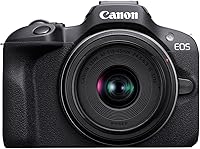
Canon EOS R100: for learning everyday photography
The R100 suits beginners focused on family photos, outings, and learning camera controls. Its compact body and 24.1-megapixel APS-C sensor provide a starting point without requiring a large setup.
Human face and eye detection help with portraits, while the included lens has optical stabilization to reduce blur from camera shake. Stabilization helps with your movement; it doesn't freeze a moving child or pet.
Skip this kit if filming yourself or composing from low angles is central to your plans, because its screen is fixed. Its 4K recording uses the central area of the sensor, which narrows the view and matters in small rooms.
Canon EOS R50: for families and mixed photo-video use
The R50 suits beginners who want one camera for people, pets, and video. Its vari-angle touchscreen and tracking for people, animals, and vehicles give you more ways to frame and follow a subject.
It records uncropped 4K at up to 30 fps and offers bursts up to 12 fps with electronic first curtain shutter or 15 fps with electronic shutter. Those options suit short action sequences, but timing and focus still matter.
Skip the R50 if you only want occasional still photos and won't use its screen or tracking options. Its 24.2-megapixel resolution alone isn't a useful reason to choose it over the R100.
Nikon Z30: for tutorials, vlogging, and streaming
The Z30 suits beginners whose main goal is making video from behind or in front of the camera. Its flip-out touchscreen, people and pet eye tracking, and included 16–50mm zoom support that routine.
The built-in stereo microphone has adjustable sensitivity, and a red recording light helps confirm capture. USB-C supports Full HD 60p streaming and constant power, while HDMI supports 4K 30p streaming.
Skip this kit if you mainly want still photos and won't use those creator features. For video, decide where the camera and microphone will sit before adding accessories; a quiet room and sensible placement are useful first steps.
Is a kit lens enough for a beginner?
Yes, a kit zoom is enough to learn framing, focus, and exposure with everyday subjects. Use its wider end for rooms and scenery, then zoom in for tighter views of people or details.
A kit lens has limits in dim light and for distant subjects. Before replacing it, work out whether the problem is reach, shutter speed, camera shake, or focus.
Don't assume every blurred photo needs a new lens. Check the focus point and shutter speed first, then compare results in brighter light.
Read what a kit lens is if focal lengths are unfamiliar. Our guide to whether a kit lens is good enough helps you decide when another lens would solve a real problem.
How should beginners set up a mirrorless camera?
Start with automatic exposure, a simple photo format, and focus settings that match your subject. Keep the first setup repeatable so you can tell what changed between shots.
- Charge the battery and attach the strap. Fit the lens as directed in the manual, without forcing the mount.
- Use a compatible memory card. Back up any files before formatting it in the camera, because formatting erases them.
- Start with JPEG photos. This keeps viewing and sharing simple; explore RAW later if you want more editing control.
- Choose an appropriate focus mode. Use single focus for still subjects and continuous focus for movement, with subject detection where available.
- Learn playback and transfer. Enlarge a photo to inspect focus, then move a few files to your usual device before an important outing.
Practice the routine at home before a birthday or trip. R50 buyers can follow our beginner guide to using the Canon R50 for model-specific steps.
What should you learn first, and which mistakes should you avoid?
Learn to separate focus errors, motion blur, and exposure problems before changing several settings at once. Each has a different fix, so reviewing a failed photo is more useful than guessing.
Why are mirrorless cameras good for beginners learning exposure?
An electronic preview can make brightness adjustments easier to understand. In a mode that supports exposure compensation, photograph a still scene, change the compensation, and compare how the result brightens or darkens.
Next, learn shutter speed with a moving subject. A faster shutter can freeze movement, while a slower one can show blur; automatic exposure may need more light or a higher ISO to support the faster choice.
Avoid these common mistakes:
- Relying on stabilization for moving subjects. It reduces camera shake, but subject movement needs an appropriate shutter speed.
- Letting focus choose the wrong subject. Check the selected face or focus area when several people fill the frame.
- Using long bursts for everything. Short, timed bursts reduce duplicate files and make photo selection easier.
- Buying accessories before identifying a need. Learn what the kit can't do before choosing another lens, microphone, or support.
- Changing every setting at once. Adjust one control, compare the result, and keep a familiar automatic mode available.
For portraits, watch the background as closely as the person. Moving a few steps can remove clutter or improve the light without changing any camera setting.
How do you care for a beginner mirrorless kit?
Keep the lens protected, avoid unnecessary lens changes, and back up photos regularly. Simple care habits matter more than buying a large cleaning kit.
Use a blower to remove loose dust before wiping the front lens glass with a suitable clean lens cloth. Don't rub grit across the glass or touch the sensor.
When changing lenses, switch the camera off and work away from wind, sand, and spray. Keep the body opening exposed for as little time as possible, and follow the manual for cleaning.
Use a padded compartment in your bag and let damp gear dry before storage. Our guide to traveling with a camera covers carrying and protecting a kit on outings.
Are mirrorless cameras good for beginners who want to grow?
Mirrorless cameras are good for beginners when the camera fits a clear use and you'll practice with it regularly. Choose your main subject first, then match the screen, focus options, and lens to that job.
Pick the R100 for straightforward still photography, the R50 for a broader mix of family photos and video, or the Z30 when recording and streaming lead the decision.
If another model is on your shortlist, read whether the Sony A6400 is good for beginners. Then use our guide to how to choose a beginner mirrorless camera to compare your actual needs.
Start with one kit zoom and learn what limits you encounter. Our beginner mirrorless camera guide can help turn those needs into a focused shortlist before you buy.
Frequently asked questions
Are mirrorless cameras easier than DSLRs for beginners?
Mirrorless cameras can be easier to learn because their electronic view can preview brightness changes before you take a photo. Automatic focus features can also help, but both camera types require practice with shutter speed, framing, and focus placement, so comfortable controls matter more than the camera label.
Do beginners need to buy extra lenses?
No, beginners can learn with the included kit zoom before adding another lens. Use it for everyday photos and note where it falls short, such as distant subjects or dim rooms, then choose a compatible lens that solves that specific problem rather than buying several at once.
Is a mirrorless camera too complicated for a beginner?
A mirrorless camera doesn't have to be complicated if you start in automatic mode with one lens. Learn how to select a subject, review sharpness, and adjust brightness before exploring manual controls, then keep a familiar automatic setting available for moments you don't want to miss.
Should a beginner choose the Canon R50 or R100?
Choose the Canon R50 if you want a vari-angle touchscreen, broader subject tracking, and more flexible video options. Choose the R100 for a compact still-photo kit when a fixed screen suits your routine, and skip it if filming yourself or composing from awkward angles is a main goal.