Best Beginner Cameras for Family Photos and Travel
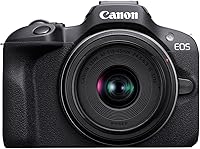
The Canon EOS R50 Kit (RF-S 18-45mm) is the best beginner camera here for families who want subject tracking, a movable touchscreen and room to add lenses. Choose the Kodak PIXPRO FZ55 if pocketable snapshots and a built-in zoom matter more.
On this page (10 sections)
- Which best beginner camera fits your daily routine?
- Is a compact camera better for simple travel photos?
- Which mirrorless camera should a beginner choose?
- What features matter most in a first camera?
- Is the included kit lens enough for family photos and travel?
- How should you set up a beginner camera before the first outing?
- How do you get sharper family photos without buying more gear?
- What should you pack, and how should you care for the camera?
- What beginner camera mistakes should you avoid?
- Which best beginner camera should you buy?
The Canon EOS R50 Kit (RF-S 18-45mm) is the best beginner camera here for families who want people tracking, flexible framing and room to add lenses. Choose the Kodak PIXPRO FZ55 if your priority is a pocketable camera for casual travel snapshots.
A first camera should fit the pictures you take now and the amount of gear you want to carry. Extra controls help only if you'll use them, while a small camera earns its place by being easy to bring along.
The Canon EOS R100 Kit (RF-S 18-45mm) suits a still-photo learner who is comfortable with a fixed screen. The Nikon Z30 With Wide-Angle Zoom makes more sense when recording yourself, making tutorials or streaming will be part of your routine.
Which best beginner camera fits your daily routine?
Choose the R50 for a growing family photography setup, the FZ55 for pocketable snapshots, the R100 for learning still photography, or the Z30 for regular video creation. Start with your main activity rather than the longest feature list.
| Camera | Buyer or situation | Main buying consideration |
|---|---|---|
| Kodak PIXPRO FZ55 | Casual travelers who want a pocketable camera | Its built-in lens keeps things simple but cannot be replaced |
| Canon EOS R50 Kit (RF-S 18-45mm) | Families learning photos and video | You need room for a body and attached lens |
| Canon EOS R100 Kit (RF-S 18-45mm) | Beginners learning still photography | Its fixed screen limits framing from awkward positions |
| Nikon Z30 With Wide-Angle Zoom | Beginners making videos and recording themselves | Buy it because you'll use its creator features |
Picture an ordinary outing before making your choice. A walk with children, a museum visit and a video recorded at a desk place different demands on a camera.
For family outings, quick access and keeping attention on your subject matter most. For planned videos, screen position, sound and a repeatable setup deserve more weight.
If camera types are new to you, our guide to what a mirrorless camera is explains the basic design. You can also browse our beginner mirrorless cameras section for related advice.
Is a compact camera better for simple travel photos?
A compact camera is the better fit when carrying less matters more than changing lenses. Choose one for a camera you can keep close during meals, walks and sightseeing without planning a separate camera bag.
A built-in lens also removes an early decision. You learn framing, light and timing with the camera you have instead of shopping for another lens before you know what you need.
Mirrorless makes more sense if you want to build a system around portraits, distant subjects or other interests. That flexibility comes with choices about lenses, storage and how much equipment to bring.
Neither camera type removes the need to pay attention to light. A person standing beside a bright window may look better than the same person under a dim ceiling light, regardless of which camera you choose.
Kodak PIXPRO FZ55
Best for pocketable travel snapshots
The FZ55 has a 16MP CMOS sensor and a built-in lens starting at a 28mm-equivalent wide-angle view. That wider setting helps with group pictures, buildings and scenes where you cannot step farther back.
Its appeal is a small setup with straightforward controls. You can concentrate on choosing your viewpoint rather than deciding which lens to attach.
The longer end of its zoom helps tighten framing on details across a street or a person standing farther away. Keep the camera steady as you zoom in, because small hand movements become more visible in a narrower view.
The FZ55 records 1080p video, which suits short trip clips and family moments. Choose a different option here if 4K recording is a firm requirement.
Buy it if you want a separate camera for everyday pictures and accept the limits of a fixed lens. Skip it if your main goal is building a lens collection or making video a central hobby.
Before buying, name what you want beyond your phone: a dedicated device, optical zoom or a camera you can hand to someone without sharing your phone. Our guide to whether compact cameras are worth it helps with that decision.
Which mirrorless camera should a beginner choose?
The Canon R50 is the strongest all-round match here for family photos and learning, while the R100 suits a simpler still-photo plan and the Z30 favors creator work. Choose according to the controls and shooting habits you'll use most often.
An interchangeable-lens camera does not require several lenses on day one. Start with the included zoom and learn what its framing range covers before expanding the setup.
Canon EOS R50 Kit (RF-S 18-45mm)
Best for active family outings
The R50 combines a 24.2MP APS-C sensor with a vari-angle touchscreen and an electronic viewfinder. Its autofocus detects and tracks people, animals and vehicles, making it a useful fit for families whose subjects rarely stay still.
The movable screen helps you frame at a child's height or hold the camera above a crowd. The viewfinder gives you another way to compose when you prefer holding the camera close to your face.
The included RF-S 18-45mm F4.5-6.3 IS STM lens provides an everyday starting range. Use the wider end for a group or room, then move toward the longer end for tighter pictures of one person.
For action, continuous shooting reaches 12 fps with the electronic first curtain shutter or 15 fps with the electronic shutter. Use short bursts around a likely moment, such as a jump or a laugh, rather than holding the shutter down through an entire activity.
Video includes 6K-oversampled, uncropped 4K at up to 30 fps. That makes the kit a practical choice if you want to learn both family photography and more planned video work.
Buy the R50 if you expect to use subject tracking, a flexible screen and different lenses over time. Skip it for the FZ55 if carrying a body and attached lens would leave the camera at home.
A good first goal is learning focus, exposure compensation and image review before adding more gear. Our Canon R50 beginner setup guide gives you a useful next step.
Canon EOS R100 Kit (RF-S 18-45mm)
Best for learning still photography
The R100 pairs a 24.1MP APS-C sensor with human face and eye detection in a compact mirrorless body. It suits a beginner who wants to learn composition and exposure with an included zoom lens.
Its fixed rear display is the clearest reason to think about how you shoot. Pictures framed from a normal standing position are a different task from low-angle child portraits, overhead shots or recordings where you need to see yourself.
Buy it if your plan centers on still photos and you are comfortable moving your body to find a workable viewing angle. Skip it if a screen that turns toward you or tilts into awkward positions is essential.
The included lens has optical image stabilization to help reduce blur from camera shake. Stabilization helps with your movement, but a person moving through the frame still needs a suitable shutter speed.
The R100 records Full HD at up to 60 fps and 4K at 24 fps from the central area of the sensor. The narrower view in that 4K mode matters when you need to fit a room or several people into the frame.
Choose it for the still-photo workflow you want today, rather than assuming every mirrorless kit handles video in the same way. Our Canon R50 vs R100 guide explains the choice between these two kits in more detail.
Nikon Z30 With Wide-Angle Zoom
Best for first video projects
The Z30 suits beginners whose camera routine includes self-recording, tutorials and streaming as well as still photos. Its flip-out touchscreen lets you check your framing from in front of the camera.
The included 16-50mm lens gives you a wide starting view for interiors and scenes with more surroundings. Its vibration reduction helps steady the image, while eye tracking covers people and pets.
For video, the Z30 offers 4K recording, a built-in stereo microphone with adjustable sensitivity and a red recording light. Those features address practical beginner needs: framing yourself, checking that recording has started and managing sound.
Streaming options include Full HD 60p over USB-C and 4K 30p over HDMI, with constant power available over USB-C. Choose the connection that suits your computer or streaming setup before planning a long session.
Buy it if you can name videos you want to make regularly, such as cooking demonstrations, craft tutorials or travel diaries. Skip it if those plans are vague and you mainly want quick still photos on family outings.
Start with a stable camera position, clear speech and a tidy background before adding accessories. For another direction within mirrorless photography, read whether the Sony A6400 suits beginners.
What features matter most in a first camera?
Prioritize comfortable handling, useful autofocus and a lens range that fits your subjects. Screen movement and video features come next, based on how often you will actually use them.
How should you compare the best beginner cameras?
Compare the moments each camera needs to handle, rather than choosing by megapixels alone. A family picture needs the right focus, enough shutter speed and suitable light before extra detail becomes useful.
Write down your three most common subjects. If they are children, pets and holidays, give subject tracking and easy access more weight than features meant for a desk-based video setup.
Also decide where your pictures will go. Sharing with family, making prints and editing heavily are different habits, so avoid buying around a use you do not expect to pursue.
How does autofocus help with family pictures?
Autofocus sets the focus distance, while subject detection helps the camera recognize what should stay sharp. For portraits, focus on the nearest visible eye when you have a clear view of it.
Tracking is useful when a person moves, but it cannot choose the family member you care about in every scene. Check the focus marker and select the intended person when several faces compete for attention.
If a face is hidden, very small or poorly lit, move to a clearer angle. Changing your position often solves the problem faster than searching through more settings.
Why does screen movement matter?
A movable screen changes where you can hold the camera while still seeing the frame. It is especially useful for child-height pictures, low viewpoints and recording yourself.
A fixed screen can suit straightforward still photography if you are comfortable crouching or changing position. Decide based on real shooting angles, rather than treating screen movement as a feature everyone needs equally.
How much video capability do you need?
Choose video features around your intended projects and editing habits. Short family clips place different demands on a camera than regular tutorials, self-recorded travel videos or streaming sessions.
Higher resolution also creates a storage and file-handling job. Make sure you are willing to transfer, organize and keep the footage instead of choosing a recording mode only because its number is larger.
Sound deserves attention too. A clear voice and a stable frame can make a simple clip more useful than a higher-resolution recording with distracting noise.
Is the included kit lens enough for family photos and travel?
The included zoom is enough to start learning and covering everyday scenes. Use it for several outings before deciding that another lens will solve a real problem.
A zoom lets you frame a street scene, a small group and a closer view of one person without changing lenses. It also helps you learn which views you use most often.
Our guide to what a kit lens is explains the basics. For the next buying decision, read whether a kit lens is good enough before adding equipment.
Use the wider end with care
Use the wider end when space is tight or you want to show a person within a scene. Keep faces away from the extreme edges, and avoid placing the camera very close to someone's face.
For a more natural-looking portrait, step back and use a longer setting when space allows. Camera distance changes how facial features appear.
Name the limit before buying another lens
Buy another lens only when the same limitation keeps affecting your pictures. Distant subjects that remain too small, cramped rooms and dim indoor scenes are different problems that call for different solutions.
Keep a short note after each outing about pictures you could not make. A repeated pattern gives you a stronger reason to buy than a general feeling that your kit is incomplete.
Lens compatibility matters as well. Check the camera mount and the lens's intended use before adding anything to your bag.
How should you set up a beginner camera before the first outing?
Start with a charged battery, a compatible card and a simple photo mode. Then practice the full process from taking a picture to saving a copy on your usual device.
Prepare the battery and memory card
Follow the camera's charging instructions before leaving home. For the FZ55, charge the included battery for at least 4 hours before first use; normal in-camera USB charging takes about 2 hours.
The FZ55 accepts Class 10 SD, SDHC or SDXC cards up to 512GB. For the other cameras, use the manual's card requirements, especially if you plan to record video.
Insert the card with the camera turned off. If it contains files you need, copy them elsewhere before formatting it in the camera.
Formatting prepares a card for use but removes its contents. Do it deliberately, rather than treating it as a routine button to press whenever something seems wrong.
Keep the first photo setup simple
Set the date and time, choose an automatic photo mode and begin with JPEG files if you want pictures that are easy to share. Save more advanced file and exposure choices for when you have a reason to use them.
Photograph a still object, a person and a moving subject near home. Practice finding focus, reviewing the result and enlarging the image to check whether the important detail is sharp.
For a mirrorless kit, follow the lens instructions for mounting and preparing it for use. Do not force a lens or control that does not move as expected.
Confirm your transfer routine
Transfer a few photos to the phone or computer you plan to use. Check that you can find the files again after disconnecting the camera or card.
Set up folders by date or trip, and keep a second copy of important pictures. A camera card should not be the only place family photos exist.
How do you get sharper family photos without buying more gear?
Use better light, a suitable shutter speed and deliberate focus placement before blaming the camera. Those three choices solve many common beginner problems.
Separate subject motion from camera shake
A blurry person against a sharp background often points to subject movement or missed focus. Blur across the whole frame can come from camera movement, though reviewing several images helps you understand the pattern.
Hold the camera with both hands and keep your elbows close to your body. When using a longer zoom setting, take extra care with your stance and shutter press.
For active children, shutter priority is useful if your camera offers it. Around 1/500 second can be a starting point in good light, with faster speeds for quicker movement and slower speeds for calmer subjects.
A faster shutter may require a higher ISO or more light. Accept some image noise when it helps preserve a sharp expression.
Look at the light before changing settings
For a simple portrait, place your subject near a window or in open shade. Turn them gradually until the face has even light and comfortable eyes.
Bright light behind a person can leave the face dark. Change your position or use exposure compensation, checking that important bright areas still retain detail.
For group pictures, keep faces at similar distances from the camera where possible. Avoid arranging one person very close to the lens while others stand far behind.
Frame the moment, then simplify it
Get down to a child's eye level when that viewpoint suits the picture. Check the background for poles, bright objects or clutter that pulls attention away from the face.
Take a wider scene, a medium view and a detail instead of making many nearly identical pictures. That gives a family outing a clearer visual story.
What should you pack, and how should you care for the camera?
Pack working essentials and basic protection, then keep the camera easy to reach. A heavy bag of rarely used accessories can make a small family outing harder than it needs to be.
A practical starter kit includes:
- A compatible memory card with enough free space.
- A charged battery and the charging gear your camera requires.
- A protective bag or pouch and the appropriate lens cap.
- A clean microfiber cloth and a hand-operated blower.
- A strap fitted securely before the outing.
For the FZ55, allow for its stated battery life of about 200 shots per charge when planning longer days. Actual use varies, so check the battery before leaving rather than assuming yesterday's charge is enough.
Protect the lens and body
Use a blower to remove loose dust before wiping glass with a clean lens cloth. Do not rub grit across the lens or use a shirt that may carry dirt.
Keep the camera away from splashes, sand and loose items that could scratch it. Do not assume a camera is weatherproof unless its instructions confirm the protection you need.
For interchangeable-lens cameras, avoid changing lenses in wind or blowing dust. Have the next lens ready and keep the open mount pointed downward during the change.
Plan for travel conditions
Keep charging equipment where you can find it, and avoid leaving the camera in a hot parked vehicle. Use a protective cover or put it away when conditions become unsuitable.
When bringing a cold camera into warm, humid air, keeping it in a closed bag while it warms can help reduce condensation. Let moisture clear before using or packing away damp equipment.
Our guide to traveling with a camera covers packing and handling in more detail.
What beginner camera mistakes should you avoid?
Avoid buying extra gear before learning the included setup. First find out whether your main difficulty is light, focus, movement, framing or a true equipment limit.
Do not compare cameras only by sensor resolution. A missed expression or a blurred face matters more than a small difference in megapixels.
Do not assume stabilization freezes a moving child. It addresses camera movement, while subject motion still depends on shutter speed.
Avoid using the longest zoom setting for every picture. Sometimes moving closer, including more surroundings or changing your angle tells the story better.
Do not spend a whole outing adjusting menus. Learn a small set of controls at home, then focus on the people and scenes in front of you.
Also avoid deleting pictures based only on a quick glance at the rear screen. Unless space is urgent, review difficult choices on a larger display where focus and expressions are easier to judge.
Finally, do not erase a card after making just one uncertain transfer. Open several copied files and confirm your backup before clearing the originals.
Which best beginner camera should you buy?
Choose your best beginner camera by the routine you will keep: carrying it, using its controls and saving the pictures afterward. Make the decision around your next few outings rather than a distant wish list.
Pick the Kodak PIXPRO FZ55 for casual snapshots when pocket size and a built-in lens are the main reasons to carry a camera.
Choose the Canon EOS R50 Kit (RF-S 18-45mm) for family photography that includes moving subjects, varied shooting angles and learning more over time.
Pick the Canon EOS R100 Kit (RF-S 18-45mm) if still photography is your focus and a fixed display fits how you compose.
Choose the Nikon Z30 With Wide-Angle Zoom when recording yourself, making videos or streaming will be a regular part of using the camera.
Keep your first setup small, learn it before a major trip and add equipment only when a repeated need becomes clear. For help matching a setup to your destinations, see our best cameras for travel photography guide.
Frequently asked questions
What is the best beginner camera for family photos?
The Canon EOS R50 Kit (RF-S 18-45mm) is the best fit here for families who want people tracking, a movable touchscreen and interchangeable lenses. Choose the Kodak PIXPRO FZ55 if you mainly want casual snapshots and a camera that fits in a pocket rather than a separate body and lens.
Should a beginner buy a mirrorless camera or a compact camera?
Choose mirrorless if you want to learn exposure controls and add lenses for different subjects over time; choose a compact if a small camera with a built-in lens fits your routine better. Carrying the camera regularly matters more than buying a system whose size discourages you from bringing it.
Is a kit lens enough for travel?
A kit lens is enough to start with for streets, landmarks, group pictures and everyday travel scenes; use its wider end for tight spaces and its longer end for closer framing. Add another lens only after you can name a repeated problem, such as distant subjects appearing too small.
Is the Nikon Z30 a good first camera for family pictures?
The Nikon Z30 With Wide-Angle Zoom suits families who want photos alongside self-recorded clips, tutorials or streaming; its flip-out touchscreen and eye tracking for people and pets support that mix. Choose it when video will be a regular activity, rather than an occasional clip between still photos.
What should I check before taking a new camera on a trip?
Confirm that the battery is charged, the memory card works and you can transfer files to your usual device; practice changing between photo and video, finding focus and reviewing sharpness. Pack the camera with its lens cap and charging gear, then make sure you can reach it without unpacking your bag.