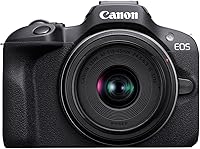
What Is a Mirrorless Camera?
A mirrorless camera is a digital camera that sends light to an image sensor without a DSLR's mirror mechanism. The sensor supplies a live electronic view, and most models let you change lenses to suit different subjects.
On this page (9 sections)
- What is a mirrorless camera, and how does it work?
- How does mirrorless compare with a DSLR or compact camera?
- Can you change lenses on a mirrorless camera?
- Which beginner mirrorless kit suits your plans?
- What should you check before buying your first kit?
- Are mirrorless cameras good for beginners?
- How should you set up a mirrorless camera?
- Which mistakes and care habits matter most?
- How do you decide if a mirrorless camera is right for you?
A mirrorless camera is a digital camera that uses its image sensor to provide a live electronic view, without the mirror mechanism found in a DSLR. Most models let you change lenses while keeping the same camera body.
That makes it a flexible choice for learning photography, family pictures, travel, and video. The buying decision is less about the word “mirrorless” and more about the lens, controls, and viewing options you'll actually use.
What is a mirrorless camera, and how does it work?
A mirrorless camera sends light through the lens to the image sensor, which records the picture and supplies the preview. You compose using the rear screen or, on models with one, an electronic viewfinder.
The electronic view can preview changes to brightness and white balance before you take a photo. Preview behavior depends on the settings, so it isn't a promise that every finished image will look exactly like the screen.
What is a mirrorless camera viewfinder?
An electronic viewfinder is a small screen inside an eyepiece that shows the sensor's view. Holding the camera at eye level can help you frame a subject when glare makes the rear screen hard to see.
A moving rear screen helps with low angles, overhead shots, and recording yourself. Check how it moves, since a tilting screen and a side-hinged vari-angle screen offer different ways to frame a picture.
How does mirrorless compare with a DSLR or compact camera?
The main difference from a DSLR is how you see the scene: mirrorless cameras provide an electronic view, while a DSLR directs light through a mirror to an optical viewfinder. Both types can use interchangeable lenses.
Removing the mirror doesn't guarantee a smaller complete setup. A large lens still needs space, so compare the camera with the lens attached rather than judging the body alone.
Read mirrorless vs DSLR for beginners if you want to weigh the viewing systems and handling choices.
A compact camera usually keeps its lens built in, which removes the need to choose a lens system. Our guide to whether compact cameras are worth it helps if convenience matters more than adding lenses later.
Can you change lenses on a mirrorless camera?
Yes, most mirrorless cameras accept interchangeable lenses, but the lens must fit the camera's mount or use a suitable adapter. A kit pairs the body with a lens so you can start taking pictures without choosing each part separately.
Canon RF and Sony E are different mounts, so their lenses aren't directly interchangeable. Don't assume that matching the brand is enough either, since one brand can have several mount systems.
Learn what a kit lens is before adding another lens to your order. A general-purpose zoom lets you discover which views you use most.
Start with that lens and notice what it can't do for your subjects. Distant birds may call for more reach, while a tight room may call for a wider view.
Which beginner mirrorless kit suits your plans?
Choose the R100 for a simple still-photo start, the R50 for moving subjects and self-recording, or the a6400 for a Sony E-mount setup. Each includes a zoom lens, so your first decision can focus on how you want to shoot.
Canon EOS R100: for everyday still photos
The R100 suits a beginner who mainly wants family portraits, travel scenes, and room to learn exposure controls. Its 24.1 MP APS-C sensor and compact, lightweight body make it a practical starting point for carrying a separate camera.
Its fixed LCD is the main handling limit here. Skip it if you expect to frame yourself often or regularly shoot with the camera near the ground.
The R100 records 4K at up to 24 fps from the central area of its sensor, which narrows the view. For self-recording in a small room, that matters more than the 4K label alone.
Canon EOS R50: for family action and self-recording
The R50 suits people photographing active children or pets, plus beginners who want to appear in their own videos. Its people, animal, and vehicle tracking helps it follow those subject types as they move.
It offers bursts up to 12 fps with electronic first curtain shutter or 15 fps with electronic shutter. Uncropped 4K at up to 30 fps also makes it the clearer video choice between these Canon kits.
Skip the R50 if your needs are mostly still subjects and you won't use the moving screen or tracking options. Those features should solve a real shooting problem, rather than simply lengthen a checklist.
Sony a6400: for starting with Sony E lenses
The a6400 suits a beginner who wants to build around Sony E mount and use one camera for still photos and video. It combines eye autofocus, shooting up to 11 fps, 4K video, and a tilting LCD.
Choose it when its lens system and tilting-screen layout fit your plans. Skip it if a vari-angle touchscreen is a priority, or if you're buying it to use Canon RF lenses directly.
Don't choose between these kits by counting autofocus points. Subject recognition, focus settings, and how easily you can place focus matter more than comparing totals alone.
What should you check before buying your first kit?
Choose around your subjects and carrying habits, then check the lens system and total setup. A camera that fits your routine gives you more chances to practice.
- Everyday subjects: For posed people, scenery, and objects, prioritize comfortable controls and a useful lens range.
- Moving subjects: Look for subject tracking, then learn continuous autofocus and suitable shutter speeds.
- Video framing: Check screen movement and whether your chosen recording mode crops the view.
- Carrying size: Include the lens, strap, spare battery, and bag when judging what you'll take out.
- Future lenses: Identify a specific need before committing to a system or buying extra glass.
These 3 cameras use APS-C sensors, so sensor format isn't the deciding factor among them. Likewise, tiny differences in megapixel counts shouldn't outweigh screen design or the way you focus.
Allow room for a compatible memory card and basic carrying protection. Extra lenses can wait until your photos reveal a need the kit lens can't meet.
Are mirrorless cameras good for beginners?
Mirrorless cameras suit beginners who want automatic settings now and more control later. You can leave one lens attached and learn a single setting at a time.
Start in an automatic mode and concentrate on light, framing, and timing. Move to aperture priority when you want to explore background blur, then learn shutter speed for moving subjects.
Our guide to whether mirrorless cameras are good for beginners explains the learning tradeoffs. If you mainly want quick snapshots with minimal equipment choices, a built-in-lens camera may fit your habits better.
How should you set up a mirrorless camera?
Start with a charged battery, compatible memory card, and securely attached lens. Attach the strap before carrying the camera, and follow the camera manual for fitting or extending the lens.
Format the card in the camera after saving any files you need elsewhere. Formatting erases its contents, so check before confirming.
JPEG is a simple starting format for sharing photos; RAW gives more editing flexibility but requires a suitable editing workflow. Set the date and time so your files sort correctly.
For a still subject, begin with single autofocus and place focus on the part you want sharp. For moving people or pets, use continuous autofocus and subject detection where available.
Take a few pictures near a window and inspect the subject at a larger view. If faces look blurred, check focus and shutter speed before assuming the camera needs replacing.
For model-specific steps, follow our Canon R50 beginner setup guide.
Which mistakes and care habits matter most?
Avoid slow shutter speeds, needless lens purchases, and rough cleaning. These cause more practical trouble than choosing between similar sensor resolutions.
A stabilized lens can reduce blur from camera shake, but it can't freeze a moving child. Use a faster shutter speed for movement, accepting a higher ISO when needed.
Don't open the aperture as wide as possible for every portrait. With people standing at different distances, a smaller aperture can help keep more faces sharp.
Change lenses in a sheltered place, with the camera off and the opening facing down. Have the next lens ready, then replace the rear cap on the one you remove.
Use a clean lens cloth for glass and avoid touching the sensor. Follow the manual for sensor cleaning, and seek service if dust remains beyond what the camera's cleaning function can handle.
After shooting, copy your files and keep another backup before clearing the card. A memory card should be a working space, not your only photo archive.
How do you decide if a mirrorless camera is right for you?
If you're asking what is a mirrorless camera to decide whether to buy one, use this rule: choose it when lens choice and learning controls serve the photos you want. Keep the first setup small enough to carry often.
Pick the R100 for everyday stills, the R50 for subject tracking and flexible video framing, or the a6400 for a Sony E-mount start. Stay with the included zoom until you can explain exactly why another lens would help.
Use our beginner mirrorless camera guide for your next comparison. Choose by your next photo opportunity, rather than features you may never use.
Frequently asked questions
What is a mirrorless camera in simple terms?
A mirrorless camera is a digital camera that uses its image sensor to provide a live electronic view, without a DSLR's reflex mirror. Most models let you change lenses, so you can keep the same camera body while choosing a lens for portraits, distant subjects, or wider scenes.
Is a mirrorless camera better than a DSLR?
Neither type is better for everyone; mirrorless cameras provide an electronic preview, while DSLRs use a mirror to feed an optical viewfinder. Choose by the controls, lens choices, carrying size, and viewing style you prefer, especially if you already have compatible lenses for a particular system.
Do mirrorless cameras need special lenses?
Interchangeable lenses must match the camera's mount or use a suitable adapter; Canon RF and Sony E lenses don't attach directly to each other's cameras. Check the exact lens and body combination before buying, since an adapter can also affect which focus functions work and how the camera handles.
Can a mirrorless camera be used without changing lenses?
Yes, you can leave one lens attached for everyday use; a kit zoom is a practical starting point because it covers several views without a lens swap. Add another lens only when you can name a limit, such as needing more reach or a wider view.