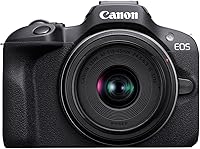
Canon EOS R50 Review: Worth It? (November 2026)
Our Canon R50 review recommends it for beginners shooting both photos and video, especially families and solo creators. Choose the kit for everyday use, but plan for another lens if distant subjects or dim indoor action are your priority.
On this page (9 sections)
- Canon R50 review: who should buy this kit?
- How useful is the R50's autofocus for families and pets?
- Is the R50 useful for video and self-recording?
- What can the included R50 lens do?
- How does the R50 compare with the R100, a6400 and Z30?
- How should a beginner set up the R50?
- Which mistakes should R50 buyers avoid?
- How should you care for the camera and lens?
- Canon R50 review verdict: which kit should you choose?
The Canon R50 is a strong first camera for mixed photo and video use, especially for families, travel and solo recording. This Canon R50 review recommends the kit if you want help following subjects while learning exposure and composition.
Its main limitation is the included lens, which favors everyday scenes over distant wildlife or dim indoor action. Buy it with a clear idea of what you shoot, rather than expecting one small zoom to cover every situation.
Canon R50 review: who should buy this kit?
Buy the R50 if you want one camera for family photos, trips and video without choosing a separate lens first. Its mix of automatic shooting options and manual control lets you start simply, then take more control as your skills grow.
The camera combines a 24.2 MP APS-C CMOS sensor with a DIGIC X processor. For everyday photography, the more useful question is whether its lens, focus tools and controls match the pictures you want to make.
A parent photographing children needs help following movement and a fast enough shutter. A solo creator needs to check framing, while a traveler needs a kit they are willing to carry.
The R50 addresses those needs through subject tracking, a movable screen and a compact kit lens. It earns its place as a general-purpose starter rather than a specialist camera for every subject.
Canon R50 review: who should skip the kit?
Skip this kit as your complete setup if distant subjects are your main goal. Birds across a lake or players on the far side of a field call for more lens reach.
Also plan beyond the kit if you mostly photograph moving people indoors without much light. A lens with a wider maximum aperture can give you more room to keep shutter speeds fast.
If you want a camera with no future lens decisions, consider whether an interchangeable-lens system fits your habits. Our guide to mirrorless cameras for beginners explains the commitment before you choose a body.
Canon EOS R50 Kit (RF-S 18-45mm): Best for family photo-video use

- 24.2 MP APS-C sensor
- People, animal and vehicle tracking
- Vari-angle touchscreen
- Uncropped 4K up to 30 fps
A useful first kit for families and creators who switch between photos and video. Subject tracking and a screen that turns toward you make both tasks easier to manage.
Pros
- Tracks people, animals and vehicles
- Screen supports self-framing and awkward angles
- Uncropped 4K recording
- Electronic viewfinder for eye-level framing
Cons
- Kit zoom has limited reach for distant subjects
- Kit lens aperture limits options for dim indoor action
How useful is the R50's autofocus for families and pets?
The R50's subject detection is a practical reason to choose it for people, animals and vehicles. Dual Pixel CMOS AF II provides 651 AF zones with coverage of up to 100% horizontally and vertically.
Tracking helps keep focus on a subject as you reframe, so you can spend more attention on timing. It does not prevent blur caused by a slow shutter or a moving camera.
For children running outdoors, select the appropriate subject type and use continuous autofocus. Keep an eye on where the focus indicator lands, especially when several people overlap.
If the camera follows the wrong person, select your intended subject again rather than assuming it understands the scene. In a busy frame, your choice still matters.
Continuous shooting reaches up to 12 fps with electronic first-curtain shutter or 15 fps with electronic shutter. Use short bursts around a likely moment instead of holding the shutter through an entire activity.
Electronic shutters can produce distorted shapes with fast movement or banding under some artificial lights. If that happens, change shutter mode and check a few frames before continuing.
Is the R50 useful for video and self-recording?
The R50 suits solo recording and everyday video, with a vari-angle touchscreen that lets you check your position while facing the camera. It also helps when you frame from above a crowd or close to ground level.
Video options include 6K-oversampled, uncropped 4K at up to 30 fps and Full HD high-frame-rate recording at up to 120 fps. Choose the former for detail and the latter when you want material for slow motion.
For a talking clip, set the camera on a stable support and check the frame from your actual speaking position. Leave space around your head so small movements do not push you out of view.
Movie for Close-up Demo Mode shifts focus to the closest subject. That can help when presenting an object, but it is less useful if your face should remain sharp while your hands move near the lens.
Record a short sample and listen to it before a longer session. A clear picture cannot compensate for speech buried under room echo, wind or background noise.
For still photos, the 2.36-million-dot electronic viewfinder provides another way to compose at eye level. If you are deciding between camera types, read our mirrorless camera vs point-and-shoot guide.
What can the included R50 lens do?
The RF-S 18–45mm F4.5-6.3 IS STM lens is a useful learning zoom for everyday scenes, travel details and family pictures. Start with it if you do not yet know which focal lengths you prefer.
Use the wider end for rooms, groups and scenes where the surroundings matter. Move toward the longer end for tighter framing, while leaving enough working distance for a comfortable perspective.
Avoid placing faces at the edges of a very close, wide-angle group photo. Step back when possible and keep the camera level to reduce stretched-looking faces and leaning vertical lines.
The variable maximum aperture means less light can enter at the long end than at the wide end. Indoors, watch your shutter speed as you zoom, especially when photographing movement.
Image stabilization helps with camera shake, but it cannot freeze a child running across a room. A faster shutter, more light or a different lens may be the answer.
Our explanation of what a kit lens is covers the basics. If you are unsure whether to replace yours, read is a kit lens good enough? before buying extra gear.
Keep notes on the shots you cannot make: too distant, too cramped or too dark. Those notes give you a better shopping brief than choosing a lens because it sounds more advanced.
How does the R50 compare with the R100, a6400 and Z30?
The R50 is the most balanced starting point here for mixed use, while the alternatives suit more specific priorities. Compare the screen, lens system and recording workflow before small differences in sensor resolution.
| Camera kit | Best reason to consider it | Main reason to skip it |
|---|---|---|
| Canon EOS R50 Kit (RF-S 18-45mm) | Family photos and self-recorded video in one kit | You need a specialist lens from day one |
| Canon EOS R100 Kit (RF-S 18-45mm) | Everyday stills with straightforward framing needs | A fixed screen would limit your shooting |
| Sony a6400 Kit (16-50mm) | You want to build around Sony E lenses | You prefer a side-opening screen |
| Nikon Z30 With Wide-Angle Zoom | A desk-based recording or streaming setup | You want to keep using Canon RF or Sony E lenses |
Canon R100: for casual stills learners
Choose the R100 if everyday photos matter more than screen flexibility. It combines a 24.1 MP APS-C sensor with human face and eye detection, and includes the same lens range as the R50 kit.
Its fixed LCD makes self-framing and awkward shooting positions less convenient. Its 4K footage uses the central sensor area at up to 24 fps, so allow for a narrower view when planning video.
Skip it if frequent self-recording is already part of your plans. Our Canon R50 vs R100 comparison explains the choice in more detail.
Sony a6400: for buyers choosing Sony E
Choose the a6400 if Sony E lens compatibility matters to your plans. This kit includes a 16–50mm zoom, a tilting LCD and continuous shooting up to 11 fps.
Check how the screen moves against the positions you actually use. A tilting design and a side-opening screen solve framing problems differently, particularly when recording yourself.
Skip this kit if its main appeal is simply avoiding the R50's lens limits, since a short zoom still has limited distant-subject reach. See our Canon R50 vs Sony a6400 comparison for the closer decision.
Nikon Z30: for desktop video creators
Choose the Z30 if streaming and tabletop recording drive the decision. Its flip-out touchscreen, adjustable built-in stereo microphone and red recording light address practical solo-video needs.
It supports Full HD 60p streaming over USB-C, 4K 30p streaming over HDMI and constant power over USB-C. Confirm that your computer, software and connection plan fit the workflow before building a recording setup.
The included 16–50mm lens and people-and-pet eye tracking also support everyday use. Skip it if staying with another lens mount matters more than its creator features.
How should a beginner set up the R50?
Start with a charged battery, a suitable memory card and simple settings. Get comfortable making a clear picture before changing several controls at once.
- Attach the strap and lens securely, then remove the lens cap.
- Back up any files on the memory card before formatting it in the camera.
- Set the date and time so your photos remain easy to organize.
- Begin with automatic exposure and JPEG files for a simple workflow.
- Match the autofocus subject setting to what you are photographing.
- Make a few photos, enlarge them on playback and check focus and motion blur.
For moving subjects, learn shutter-priority shooting next. For a still subject where background blur matters, explore aperture-priority mode.
Change one setting at a time and compare the result. That makes it easier to understand why an image changed, rather than guessing which adjustment helped.
Choose storage around your intended video mode and shooting habits. Our guide to the SD card the Canon R50 needs explains that decision.
Bluetooth pairing and Wi-Fi work with compatible smart devices through Canon Camera Connect. Set up transfers at home before relying on them during a trip.
Which mistakes should R50 buyers avoid?
The biggest mistake is expecting autofocus or stabilization to solve every blurry photo. Focus errors, subject movement and camera shake require different fixes.
If the background is sharp but a moving person is blurred, try a faster shutter. If nothing looks sharp, check focus placement, camera movement and whether the lens needs cleaning.
Do not judge every photo at extreme enlargement before considering its intended use. Look first at whether the subject is clear and the image works at your normal viewing size.
Avoid buying several lenses before using the kit regularly. One clear limitation is enough to guide a useful upgrade, while a bag of unfamiliar equipment can slow your learning.
Keep spare cards and batteries organized so you can distinguish ready items from used ones. Back up your pictures after important outings rather than treating the memory card as permanent storage.
How should you care for the camera and lens?
Use simple cleaning and careful storage to keep the kit ready. Fit the lens cap during transport and keep the camera in a padded compartment where loose items cannot rub against it.
Remove loose dust with a blower before wiping glass with a clean lens cloth. Do not scrub grit across the front element or use household cleaners on optical surfaces.
Change lenses in a sheltered place with the camera opening facing down. Have the replacement ready so the body stays open for as little time as practical.
After bringing cold equipment into a warm room, let it warm gradually inside a closed bag. Avoid powering it on or changing lenses while moisture is forming.
Canon R50 review verdict: which kit should you choose?
Choose the R50 if photos and video share equal space in your plans and you want a kit that supports learning both. Its 8.9 score reflects how well the focus tools, framing options and recording features fit that buyer.
Choose the R100 for casual stills if a fixed screen meets your needs, the a6400 if Sony E is your intended system, or the Z30 if desktop video connections are central to your routine.
The decision from this Canon R50 review is to buy around your hardest regular task. For distant wildlife or dim indoor action, work out the lens plan before committing to the kit.
For your first steps, follow our guide to using the Canon R50 as a beginner. When you can name a specific lens limitation, use our best lenses for the Canon R50 guide to choose the next tool.
For other models, browse our matchups and camera reviews. Canon's EOS R50 page provides manufacturer information about the camera.
Frequently asked questions
Is the Canon EOS R50 good for beginners?
Yes, the R50 suits beginners who want to learn photography while also recording video; automatic photo functions let you start simply, while manual exposure gives you room to learn. Its subject tracking helps with people and pets, but a suitable shutter speed still matters when they move.
Does the Canon EOS R50 record 4K video?
Yes, the R50 records uncropped 4K at up to 30 fps, oversampled from 6K, plus Full HD high-frame-rate footage up to 120 fps. Choose 4K for detail and Full HD high-frame-rate recording for slow-motion material, with enough light to support the faster capture rate.
What lens comes with the Canon R50 kit?
This kit includes the RF-S 18–45mm F4.5-6.3 IS STM lens; it is a compact starting point for everyday scenes, family photos and travel, but its reach is limited for distant subjects. Use it to learn your preferred framing before choosing a wider, longer or brighter lens.
Should I choose the Canon R50 or R100?
Choose the R50 if self-recording, flexible screen positions and mixed photo-video use matter to you; choose the R100 if you mainly want everyday stills and can work with a fixed screen. Both kits cover the same lens range, so the R100 does not solve a need for more reach.