8 Best Cameras for Family Photos (November 2026)
The best best cameras for family photos include the Kodak PIXPRO FZ55 for everyday family outings, the Canon EOS R50 Kit (RF-S 18-45mm) for active young families, and the Canon EOS R100 Kit (RF-S 18-45mm) for learning family portraits.
On this page (8 sections)
- Which is the best camera for family photos?
- How should your usual family photos shape the choice?
- Is a compact or mirrorless camera better for family photos?
- How should you set up a family camera before an event?
- How can you get sharper, more natural family photos?
- Which mistakes make family photos harder?
- How should you care for the camera and keep photos safe?
- Which family camera should you choose?
The Kodak PIXPRO FZ55 is the best camera for family photos if you want a simple pocket camera for everyday outings. Choose the Canon EOS R50 Kit (RF-S 18-45mm) when moving children and flexible screen positioning matter more.
The right choice depends on the photos you miss now: groups in tight rooms, fleeting expressions or children too far away. A camera that solves that problem and comes along regularly is more useful than one bought for features you rarely need.
For a shorter shortlist, see our guide to beginner cameras for family photos and travel. If interchangeable lenses are new to you, our guide to what a mirrorless camera is explains the basics.
Our picks at a glance
-
1

-
2

-
3
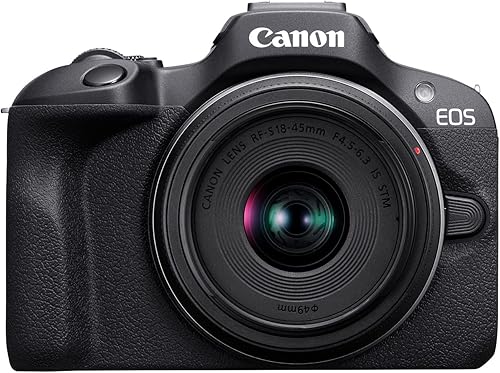 Best for learning family portraits
Canon EOS R100 Kit (RF-S 18-45mm)
8.8/10 our score
See it on Amazon
Which is the best camera for family photos?
The FZ55 is our convenience-first choice, while the R50 is the stronger fit for families who prioritize tracking moving people. Choose a long built-in zoom when your usual problem is distance rather than carrying size.
FairGlance compared focus features, framing, power and lens options against common family situations. The scores favor everyday usefulness, so a lower-scoring specialist can still be your best choice.
Best camera for everyday family photos: Kodak PIXPRO FZ55
Kodak PIXPRO FZ55: Best for everyday family outings
- 16 MP CMOS sensor
- 5x optical zoom
- 28mm wide angle
- USB charging
A pocketable camera for families who want a built-in zoom and a rechargeable battery. Choose it for casual outings rather than making moving subjects your main priority.
Pros
- Pocketable body
- Built-in zoom needs no lens changes
- Included battery charges over USB
Cons
- Fixed LCD limits framing angles
- No people-tracking feature described
The FZ55 suits the parent or grandparent who wants a dedicated camera without building a lens collection. Its pocketable body makes sense for park visits, meals out and holidays where the camera needs to stay close.
The built-in lens offers 5x optical zoom starting at 28mm, covering group scenes and tighter framing without a lens change. Use the wide end for context, then zoom in when a face or small detail matters more than the surroundings.
Power comes from an included rechargeable battery that charges over USB. Kodak recommends at least 4 hours for the first charge; later full charges take about 2 hours, with about 200 shots per charge.
The fixed screen is the main framing compromise, especially if you want to hold the camera low beside a child. Skip it if moving-subject tracking is your main reason for buying a camera, and choose the R50 for that role.
Canon EOS R50 Kit for active families
Canon EOS R50 Kit (RF-S 18-45mm): Best for active young families
- 24.2 MP APS-C sensor
- People and animal subject tracking
- Vari-angle touchscreen
- RF-S 18-45mm kit lens
People tracking and a movable touchscreen suit children in motion and photos taken near their eye level. The interchangeable-lens design also leaves room to expand.
Pros
- People and animal tracking
- Flexible touchscreen positioning
- Bluetooth and Wi-Fi
Cons
- Lens system adds buying choices
- Included lens offers limited reach for distant events
The R50 is the pick for families whose children rarely stay in one place. People detection and tracking help keep attention on a moving person, while the vari-angle touchscreen lets you frame near floor level without lying down.
Its 24.2 MP APS-C sensor and included RF-S 18-45mm lens provide a starting point for portraits and outings. You can keep that lens attached while learning rather than treating extra lenses as an immediate requirement.
Continuous shooting reaches 12 fps with the electronic first-curtain shutter or 15 fps with the electronic shutter. Use short bursts around a jump, hug or changing expression, then choose the frame where faces and gestures work together.
Buy it if you want focus assistance and room to learn camera controls. Skip it if you mainly want something to slip into a pocket, and use our guide to using the Canon R50 as a beginner to plan your first setup.
Canon EOS R100 Kit for learning portraits
Canon EOS R100 Kit (RF-S 18-45mm): Best for learning family portraits
- 24.1 MP APS-C sensor
- Human face and eye detection
- Canon RF mount
- Compact camera body
A starting point for families who want to learn with an interchangeable-lens camera. Face and eye detection help with portraits, while the fixed screen favors straightforward framing.
Pros
- Human face and eye detection
- Compact, lightweight body
- Supports other RF lenses
Cons
- Fixed screen limits viewing positions
- 4K uses a central sensor crop
The R100 suits families who want to learn portrait photography with an interchangeable-lens camera. Its human face and eye detection helps place focus where it matters, leaving you more attention for expressions and backgrounds.
The compact body combines a 24.1 MP APS-C sensor with an RF-S 18-45mm lens. Start with nearby portraits, holiday scenes and small groups before deciding whether another RF lens would solve a recurring problem.
Its fixed LCD favors framing from a normal viewing position rather than shooting from awkward angles. Video also needs thought: Full HD reaches 60 fps, while 4K uses the central sensor area at up to 24 fps, making framing tighter.
Choose the R100 for deliberate family photos and a path into lens-based photography. Skip it if a movable touchscreen is central to how you shoot; our Canon R50 vs R100 comparison covers that decision in more detail.
Kodak PIXPRO FZ45 for outings without charging
Kodak PIXPRO FZ45: Best for outings without charging

- 16 MP CMOS sensor
- 4x optical zoom
- 27mm wide angle
- Uses 2 AA alkaline batteries
A simple compact for families who prefer carrying replacement batteries to charging a camera pack. Its wide setting helps with groups and everyday scenes.
Pros
- Replaceable AA battery power
- Wide setting for groups
- Pocketable design
Cons
- Depleted alkaline batteries need replacing
- Fixed screen
The FZ45 is for families who prefer packing replacement batteries to planning charging stops. It runs on 2 AA alkaline batteries, so a fresh pair can get it ready without waiting beside an outlet.
Its built-in lens starts at a 27mm wide view and offers 4x optical zoom. That suits a group near a picnic table, a child standing nearby or a wider view of a family outing.
A 16 MP CMOS sensor and 1080p video cover still photos and short clips, with a fixed 2.7 in screen for framing. Keep a spare battery pair together in a protective case so you're not searching a bag during a brief moment.
Choose this camera because AA power fits your routine, rather than assuming it removes all preparation. Skip it if you'll resent replacing depleted batteries or would rather charge one camera pack between outings; the FZ55 better matches that habit.
Sony a6400 Kit for changing expressions
Sony a6400 Kit (16-50mm): Best for catching changing expressions

- APS-C interchangeable-lens camera
- Eye autofocus
- Up to 11 fps continuous shooting
- Tilting LCD
Eye autofocus and burst shooting suit portraits where expressions change quickly. Choose it if you also want to build a Sony E-mount lens kit.
Pros
- Eye autofocus for portraits
- Continuous shooting for brief moments
- Expandable lens system
Cons
- Lens choices add complexity
- Kit zoom is limited for distant subjects
The a6400 suits families who want to catch the moment between posed smiles. Eye autofocus and continuous shooting up to 11 fps are useful when a child laughs, turns toward someone or changes expression quickly.
The included 16-50mm lens gives you a starting range for family scenes, while the tilting LCD lets you adjust your viewing position. Its Sony E-mount system also gives you a route to other lenses as your interests become clearer.
Use bursts with a clear moment in mind rather than holding the shutter through an entire activity. Short sequences make it easier to find a strong expression and avoid returning with many nearly identical frames.
Choose it if portraits and a growing lens system interest you. Skip it if you want a fixed-lens camera with minimal equipment decisions, and compare screen movement carefully if self-facing photos or unusual camera positions are common for your family.
Kodak PIXPRO AZ255 for distant events
Kodak PIXPRO AZ255: Best for distant family events

- 25x optical zoom
- 24mm wide angle
- Optical image stabilization
- Uses 4 AA batteries
A long built-in zoom suits children across a field or relatives on a stage. Optical stabilization helps with hand shake, though moving subjects still need a suitable shutter speed.
Pros
- Long optical reach without lens changes
- Optical image stabilization
- Wide setting for larger scenes
Cons
- Fixed screen
- Needs 4 AA batteries plus replacements
The AZ255 is the choice when you regularly photograph from the sidelines or the back of a room. Its 25x optical zoom spans a 24–600mm equivalent range, letting you move from a broad scene to a distant subject without changing lenses.
Optical image stabilization helps reduce blur caused by your hands moving. It cannot stop a running child or dancing performer from blurring, so long reach still needs enough light and a suitable shutter speed.
Find your subject with a wider view before zooming in. Starting at maximum magnification makes it harder to locate a child, follow movement and keep the framing steady.
The bridge camera uses 4 AA batteries and has a fixed screen. Choose it for distance and one-lens convenience; skip it if pocket carry is the priority or you expect a long zoom to solve dim indoor action by itself.
Canon PowerShot ELPH 360 HS for sharing outings
Canon PowerShot ELPH 360 HS: Best for sharing day trips

- 12x optical zoom
- Optical image stabilizer
- Wi-Fi and NFC
- Hybrid Auto video recaps
A slim camera for families who want a longer built-in zoom and smartphone transfers. Hybrid Auto can combine brief clips and stills into a recap.
Pros
- Longer zoom in a slim design
- Wi-Fi and NFC transfers
- Automatic video recaps
Cons
- Automatic exposure control limits manual learning
- Less reach than the AZ255
The ELPH 360 HS suits families who want a slim camera with useful reach and a route to smartphone sharing. Its 12x optical zoom and optical image stabilizer provide framing flexibility without carrying separate lenses.
Built-in Wi-Fi and NFC support transfers to compatible smartphones. Set up the connection before an outing so sharing a favorite photo doesn't become a menu task while everyone waits.
Hybrid Auto records up to 4 seconds before each photo and combines clips and stills into a recap. Use it when the sounds and small movements around a birthday or day trip matter alongside the final picture.
Its 20.2 MP CMOS sensor, 3 in LCD and 1080p video support that casual role. Choose it for automatic shooting and sharing, but skip it if learning manual exposure is a main goal or you need the AZ255's longer reach.
Nikon Z30 for family video diaries
Nikon Z30 With Wide-Angle Zoom: Best for family video diaries
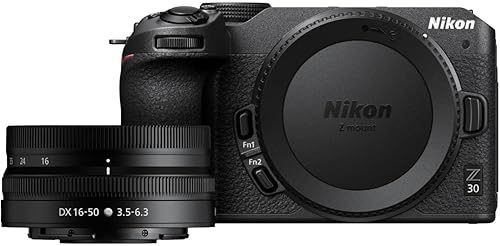
- 16-50mm wide-angle zoom lens
- Flip-out touchscreen
- People and pet eye tracking
- Built-in stereo microphone
A stills-and-video kit for families who record conversations, activities and self-facing clips. Its screen, microphone and eye tracking support that mixed use.
Pros
- Flip-out touchscreen
- Eye tracking for people and pets
- Adjustable stereo microphone sensitivity
Cons
- Video tools may go unused for stills-only buyers
- Kit lens has limited reach for distant events
The Z30 makes most sense when family memories include conversations and activities as well as still portraits. Its flip-out touchscreen and built-in stereo microphone suit self-facing clips, while eye tracking covers people and pets.
The included 16-50mm lens has vibration reduction to help with camera shake. Nikon Z lens compatibility leaves room to add a different lens later, though the supplied zoom is the sensible starting point.
For video, record a short sample and listen to it before an important event. Adjustable microphone sensitivity helps you manage recording levels, but moving closer to the speaker is often more useful than filming from across a noisy room.
Choose it if you'll regularly alternate between photos and video. Skip it if you want only occasional snapshots and would rarely use its video controls; a simple compact avoids carrying a system you don't need.
How should your usual family photos shape the choice?
Choose around your most common scene, then check the compromises it creates elsewhere. Indoor groups, moving children and distant events place different demands on a camera.
Indoor groups need space and even light
A wide view helps fit everyone into a room, but camera position still matters. Step back when possible rather than pushing the camera close to the nearest face.
Keep people near the same distance from the camera so one person isn't much closer than the rest. Leave a little space around the group for crooked framing and later cropping.
Place the group facing a window or at an angle to it, rather than putting the bright window directly behind them. Check faces for deep shadows before asking everyone to smile.
Moving children need focus and a suitable shutter speed
People tracking helps the camera follow a subject, but focus and motion blur are separate problems. A sharply focused child can still look blurred if the exposure lasts too long.
For cameras with shutter control, around 1/250 second is a useful starting point for casual movement, with faster speeds for running. Raise ISO or find better light when the image becomes too dark.
For automatic shooting, use an action mode if available and watch the results closely. Outdoors or near a bright window, the camera has more light to work with than in a dim hallway.
Distant events need reach and realistic expectations
Choose a longer optical zoom when you can't change seats or cross a barrier. For nearby portraits and meals, that extra reach may contribute less than a camera you can keep ready.
Don't compare a kit lens's millimeter range directly with a compact camera's zoom multiplier. The multiplier describes the span between that lens's widest and longest views, not a universal measure of distance.
At a performance, avoid assuming you can use flash or move freely. Plan from your permitted position and include wider photos that show the setting as well as close views.
Is a compact or mirrorless camera better for family photos?
A compact suits built-in-lens simplicity, while a mirrorless kit suits families who want to learn controls and change lenses. Carrying habits should decide before future equipment plans do.
The pocketable choices are easier to keep close during a full day out. A bridge camera such as the AZ255 keeps one built-in lens but serves a different need: broad framing range from a fixed position.
Mirrorless kits ask you to manage a separate lens system. You don't need several lenses, but you should be comfortable protecting the lens, carrying the kit and learning a few focus settings.
Keep the included zoom until you can name a repeated limit, such as not reaching a distant subject or struggling to get the portrait framing you want. Our guide to whether a kit lens is good enough helps make that call.
Also consider what your phone already does well. If you rarely miss a photo because of distance, focus control or lens choice, first decide what a separate camera will add to your routine.
For trips, our guide to choosing a camera for travel covers the wider decision. See the best compact cameras for travel if small carry size has already settled the camera type.
How should you set up a family camera before an event?
Prepare power, storage and basic focus settings before people gather. Learn how to take and review a photo without searching through menus during a birthday or school event.
- Charge the battery or pack fresh replacements, and check the camera powers on.
- Insert a compatible memory card and set the date and time.
- Back up existing photos before formatting a reused card in the camera.
- Start with automatic exposure and JPEG capture if you want straightforward files for sharing.
- Enable face or eye detection where available, and learn how to select another subject.
- Find single-frame and burst shooting so you can switch deliberately.
For the Kodak cameras here, supported storage includes Class 10 SD, SDHC or SDXC cards up to 512GB. Choose storage that matches the camera's requirements rather than buying a card based only on capacity.
Take a few sample photos in the room where you'll shoot and enlarge the faces on playback. A small preview can hide missed focus, slight blur or a person cut off at the edge.
If several adults will use the camera, show each person the shutter, zoom and playback controls. Agree on a simple default setup so the next person doesn't inherit unfamiliar settings.
Set up wireless transfers at home on cameras that support them. Keep another transfer method in mind so sharing doesn't depend on pairing a phone during an event.
How can you get sharper, more natural family photos?
Use good light, a steady hold and clear timing before adding more equipment. Better positioning often improves a family photo more than another menu adjustment.
Keep the camera steady without freezing the mood
Hold the camera with both hands and keep your elbows close to your body. Use the strap, especially when leaning over a table or photographing near water.
Ask for a brief pause for a group portrait, then keep photographing as people relax. A natural expression often follows the formal picture rather than appearing on command.
For a camera with adjustable aperture, avoid choosing the widest opening automatically for every group. People in different rows may need more depth of field to keep their faces clear.
Use burst shooting for a specific moment
Begin a short burst just before an expected action, such as a candle being blown out. Release the shutter after the moment rather than filling the card with an entire conversation.
Review whether eyes are open and the intended person is sharp. A fast burst gives you choices, but it doesn't repair poor light, missed focus or an obstructed face.
Move yourself before relying on maximum zoom
Change your position when it's safe and allowed, especially if a chair, branch or bright sign sits behind someone's head. A small sideways step can clean up the background without changing camera settings.
For children, try framing near their eye level. Mix close portraits with wider pictures showing the room, people and activity, so the photos tell more than a series of faces.
Which mistakes make family photos harder?
The biggest mistakes are leaving the camera unready and asking one feature to solve every problem. Long zoom, stabilization and face detection each help with a different part of the photograph.
- Using digital zoom first: optical zoom changes framing through the lens, while digital enlargement reduces the detail available for a given output.
- Relying on stabilization for action: it helps with camera shake, but a moving person can still blur.
- Focusing on the wrong face: check the selected subject when several people enter the frame.
- Chasing background blur for every portrait: a group needs enough depth of field for all the important faces.
- Waiting until the event to learn controls: practice the few actions you'll need before leaving home.
- Buying a lens without a clear problem: first learn what the included lens handles and where it falls short.
Don't judge a camera only by its megapixel count, either. For family use, getting the right expression in focus is more valuable than having a larger file of a missed moment.
How should you care for the camera and keep photos safe?
Protect the lens, power supply and original files with a simple routine after each outing. That makes the next day easier and reduces the chance of losing memories.
Use a padded bag or pouch, fit the lens cap when available and keep the camera away from loose keys. Avoid leaving it in a hot parked car or exposing it to rain without suitable protection.
Remove loose dust with a camera blower before gently using a clean lens cloth. Don't rub sand across glass or spray household cleaner onto the lens.
On interchangeable-lens cameras, change lenses away from wind and dust, with the opening pointed downward. Keep body and rear lens caps ready rather than leaving parts open while searching your bag.
Copy photos to a computer or another main storage location after important events, then keep a second copy elsewhere. Confirm the copies open before deleting or formatting the card.
Charge or replace batteries before putting the camera away, following its care instructions. Our guide to traveling with a camera adds practical help for packing and carrying it away from home.
Which family camera should you choose?
Choose the best camera for family photos by naming the situation you need it to handle most often. Make that decision before comparing smaller differences in resolution or video modes.
- Pick the FZ55 for casual outings when pocket carry and simple use matter most.
- Pick the R50 for moving children, people tracking and flexible framing.
- Pick the R100 for learning portraits with a lens system you can expand.
- Pick the FZ45 when replaceable AA power fits your travel routine.
- Pick the a6400 for changing expressions and an interest in Sony E lenses.
- Pick the AZ255 when you regularly photograph from far away.
- Pick the ELPH 360 HS for a slim zoom camera and smartphone sharing.
- Pick the Z30 when family video diaries will matter alongside still photos.
Keep the first setup simple, then learn it well enough to use without hesitation. If you've settled on a built-in lens, compare our best point-and-shoot cameras; for a learning-focused kit, see our beginner camera choices.
Our top 3 picks at a glance
-
1
-
2
-
3
Best for learning family portraits
Canon EOS R100 Kit (RF-S 18-45mm)
8.8/10 our score
See it on Amazon
Frequently asked questions
What type of camera is best for family photos?
A compact camera suits families who want a small camera with a built-in zoom and few equipment choices; a mirrorless kit makes more sense if people tracking, lens changes and learning controls matter. For distant school events, prioritize optical reach rather than choosing by camera type alone.
Is a mirrorless camera worth it for family photos?
A mirrorless camera is worth considering if you'll carry it regularly and use its focus tools or interchangeable lenses; the R50 suits moving children, while the R100 offers a route into family portraits. Start with the included lens and learn its limits before buying more equipment.
How much zoom do I need for family pictures?
For birthdays, group photos and nearby portraits, a useful wide setting matters more than a very long zoom; extra optical reach helps when you must stay behind a barrier or sit far from a stage. Choose around your usual shooting distance rather than the largest zoom number.
Can a camera take good family photos indoors?
Yes, but useful light and a fast enough shutter speed matter as much as focus features; move people toward window light, avoid placing a bright window behind them and keep faces near the same distance from the camera. Stabilization reduces hand shake but cannot freeze a moving child.


