Canon EOS R100 Review: Worth It? (November 2026)
This Canon R100 review recommends the compact kit for beginners focused on still photos who want to learn with an included zoom and interchangeable lenses. Choose the Canon R50 for easier self-framing and more flexible video, or the Nikon Z30 for a creator setup built around streaming.
On this page (10 sections)
- Canon R100 review: what does the kit offer?
- Who should buy the R100, and who should skip it?
- What can you photograph with the included zoom?
- How does the Canon R100 compare with the R50?
- Is the R100 a good choice for video?
- How should a beginner set up the R100?
- Which common mistakes should R100 buyers avoid?
- How do you care for the camera and lens?
- When should you choose the R50 or Nikon Z30 instead?
- Canon R100 review: which kit should you choose?
The Canon EOS R100 is a sensible first camera for still photography, especially if you want one compact kit to learn with. This Canon R100 review recommends it for everyday photos and patient learning, while pointing frequent self-filmers toward the R50.
The included zoom lets you explore framing without choosing extra lenses before you understand what you need. The key decision is whether the R100 fits how you'll shoot, particularly when subjects move or you need to see the screen from another angle.
Canon R100 review: what does the kit offer?
The R100 gives you an interchangeable-lens starting point for everyday photography. Its 24.1 MP APS-C sensor and DIGIC 8 processor sit in a compact, lightweight EOS R-series body.
Canon EOS R100 Kit (RF-S 18-45mm): Best for first-time photo learners
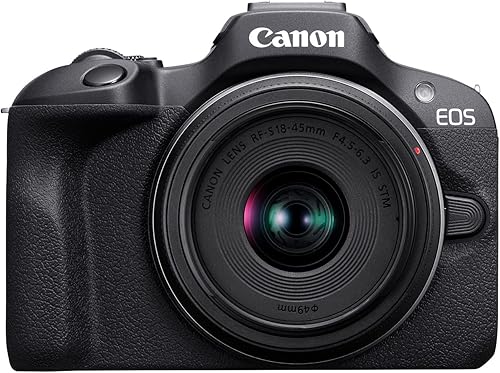
- 24.1 MP APS-C sensor
- RF-S 18-45mm kit lens
- 4K video up to 24 fps
- Fixed LCD screen
A compact kit for learning still photography with one included zoom. Choose it for everyday photos; consider the alternatives if self-filming or action is central to your plans.
Pros
- Compact, lightweight EOS R-series body
- 24.1 MP APS-C sensor
- Included lens has optical image stabilization
- Human face and eye detection
Cons
- Fixed screen limits self-framing
- 4K uses the central sensor area
- Kit lens has a modest maximum aperture
Human face and eye detection help you place focus on people. For portraits, that means you can spend more attention on expression, background and light instead of always selecting a small focus point yourself.
The included RF-S 18-45mm F4.5-6.3 IS STM lens provides a useful starting range and optical image stabilization. Our guide to what a kit lens is explains why this bundled zoom is worth learning before adding another lens.
The main handling compromise is the fixed LCD. It works for reviewing pictures and composing from behind the camera, but it won't swing toward you or tilt to make awkward camera positions easier.
Canon R100 review verdict for a first-time buyer
Buy for the photos you expect to take each week, rather than features you might use someday. The R100 makes sense for outings, posed portraits, travel details and learning exposure controls.
Skip it if your main plan involves speaking to the camera, filming yourself at a desk or shooting from unusual angles often. A movable screen changes those tasks enough to deserve priority over a small difference in resolution.
Who should buy the R100, and who should skip it?
The R100 suits beginners willing to learn a few camera habits rather than expect every scene to need the same settings. It's a good match if you want to practice with one lens and build skills gradually.
For family photos, distinguish a seated portrait from a child running across a room. Face detection helps with focus, but moving subjects still need a suitable shutter speed and focus mode.
Travelers who enjoy stopping to frame a scene can also make good use of this kit. If you prefer taking a quick picture without managing lenses or settings, think through the extra routine first.
Read what a mirrorless camera is if the camera type is new to you. Our guide to whether mirrorless cameras are good for beginners explains the learning choices behind it.
Frequent action photographers should give the R50 closer attention. The R100's stated burst maximum applies to One-Shot AF, so that headline speed shouldn't drive a decision about subjects that keep changing distance.
What can you photograph with the included zoom?
The kit lens is best treated as a learning tool for general scenes and everyday portraits. Use the wide end for a room, group or street scene, then zoom toward the long end when you want a tighter view.
For a person's portrait, avoid standing very close with the lens at its widest setting. Step back and use a longer focal length when space allows, which can give faces more natural proportions.
For softer backgrounds, put more distance between your subject and the background. Focus carefully on the eyes, and remember that a close background can stay distracting even when the subject is sharp.
The variable maximum aperture narrows as you zoom in. Indoors, that can mean accepting a higher ISO, using a slower shutter for a still subject or finding brighter light.
Stabilization reduces camera shake, not subject movement. A sharp wall behind a blurred child usually calls for a faster shutter speed, rather than simply holding the camera more firmly.
Don't buy another lens just because your first indoor pictures look dark or blurry. Learn whether the limit is light, shutter speed, focus or framing; whether a kit lens is good enough helps you decide when an upgrade solves a real problem.
How does the Canon R100 compare with the R50?
The R50 is the better choice for mixed photo and video use, especially when you need a screen that turns toward you. Its extra flexibility matters more than the tiny difference in megapixels.
| Feature | Canon EOS R100 | Canon EOS R50 |
|---|---|---|
| Sensor | 24.1 MP APS-C CMOS | 24.2 MP APS-C CMOS |
| Screen | Fixed LCD | Vari-angle touchscreen |
| 4K video | Central sensor area, up to 24 fps | 6K-oversampled uncropped 4K up to 30 fps |
| Focus features | Human face and eye detection | Subject detection and tracking for people, animals and vehicles |
| Continuous shooting | Up to 6.5 fps in One-Shot AF | Up to 12 fps with electronic first-curtain shutter; up to 15 fps with electronic shutter |
The R50's screen helps with low viewpoints, overhead framing and recording yourself. If those are regular parts of your plans, choose around that handling difference from the start.
Faster bursts can give you more moments to choose from during a brief expression or movement. They also create more files to sort, and they don't replace good timing or a shutter speed suited to the subject.
The R100 remains a reasonable choice for a person who mainly photographs calm scenes from behind the camera. See the full Canon R50 review if its handling and focus features sound useful for your routine.
Is the R100 a good choice for video?
The R100 works for occasional clips composed from behind the camera, but it isn't the strongest choice here for a video-first buyer. Its recording options include Full HD up to 60 fps and HD up to 120 fps.
The central-area capture used for its 4K narrows the view compared with using the full sensor width. That matters in a small room, where stepping back to include yourself or more of the scene may be difficult.
Before recording an important clip, choose the actual video mode and check the frame. Don't assume the composition you used for a photo will carry over unchanged.
For a seated explanation or a view of a landscape, keeping the camera steady and finding good light may matter more than recording at the highest resolution. A stable support also lets you concentrate on the subject.
If you plan to slow footage down, choose a suitable higher-frame-rate mode before recording. Slowing ordinary footage in an editor doesn't create the extra moments that were never captured.
Buyers still deciding between a simple camera and an interchangeable-lens system can use our mirrorless camera versus point-and-shoot comparison. Choose the system whose daily routine you're prepared to follow.
How should a beginner set up the R100?
Start with a simple still-photo setup and one subject, then add controls as you need them. Learning focus, exposure and file handling all at once makes it harder to tell what caused a poor result.
- Prepare your files and power. Charge the battery and fit a compatible memory card before an outing. Back up anything already on the card before formatting it in the camera.
- Attach the lens in a clean place. Keep the camera opening exposed for as little time as possible, and avoid changing lenses in blowing dust.
- Begin in an automatic photo mode. Photograph a stationary subject in good light and practice choosing the focus area. Use human face and eye detection when photographing a person.
- Review focus closely. Magnify the result during playback and check the eyes or another important detail. A picture can look sharp at a small display size while missing focus where it matters.
- Change one setting at a time. Once you understand the automatic result, try Aperture Priority for a still subject or explore shutter speed for movement. Keep a short note of what changed the result.
For portraits near a window, turn your subject toward the light rather than leaving the window directly behind them. Indoors, adding light often helps more than repeatedly changing settings in the same dim corner.
Don't begin by buying a bag full of accessories. First learn whether your routine calls for extra carrying protection, a stable support or something that solves a specific shooting problem.
Which common mistakes should R100 buyers avoid?
The biggest mistake is expecting a camera upgrade to solve every photo problem automatically. Better framing, suitable light and the right shutter speed still decide whether a picture works.
Another mistake is choosing by resolution alone. These Canon kits are close enough in pixel count that screen movement, focus features and video needs provide clearer reasons to choose between them.
Don't confuse a missed focus point with motion blur. If the background is sharp but the subject is smeared, work on shutter speed; if another object is sharp instead of the face, review focus placement.
Avoid treating digital zoom as a substitute for a lens with more reach. Frame carefully with the optical zoom and decide later whether your usual subjects genuinely need a longer lens.
Leave some space around an unfamiliar subject while learning. A slightly loose frame is easier to adjust later than a portrait with a hand or the top of a head cut off.
Finally, learn to sort and back up pictures regularly. A camera you use often needs a file routine as much as it needs a comfortable strap.
How do you care for the camera and lens?
Keep the kit clean, dry and protected during transport, with the lens cap on when you're finished. Simple habits reduce the need for more involved cleaning.
Use a suitable blower to remove loose dust from the lens before wiping it with a clean lens cloth. Rubbing grit across the glass can cause damage, so don't use a shirt or a tissue as your normal cleaning tool.
Avoid touching the sensor when the lens is removed. If marks keep appearing in the same place across photographs, seek appropriate sensor-cleaning guidance rather than poking inside the body.
When bringing a cold camera into a warm, humid room, allow it time to adjust before opening the bag. Keep it away from sand, splashes and loose items that can press against controls or glass.
For packing and carrying advice beyond daily care, read how to travel with a camera.
When should you choose the R50 or Nikon Z30 instead?
Choose the R50 for a broader mix of family photography and self-filming. It keeps you in the Canon RF system while adding the screen movement and subject tracking that make varied shooting easier to manage.
Skip the R50 if you're unlikely to use those differences and the R100 already meets your needs. Paying for more features only makes sense when they remove a problem you expect to face.
Choose the Nikon Z30 when desktop video and creator work shape your setup. Alongside its flip-out touchscreen and 16-50mm zoom, it offers a built-in stereo microphone with adjustable sensitivity and a red recording light.
Its streaming options include Full HD 60p over USB-C and 4K 30p over HDMI, with constant power available over USB-C. Those features deserve attention if you expect to make tutorials or spend time recording at a desk.
Skip the Z30 if you want to build around Canon RF lenses, since it uses Nikon Z mount. Its creator features also give a still-photo learner less reason to change systems.
Our guide to how to choose a beginner mirrorless camera can help you weigh the body, lens system and daily handling together.
Canon R100 review: which kit should you choose?
This Canon R100 review favors the R100 for deliberate, everyday still photography. Choose it when you're ready to learn with the included zoom and can comfortably work from behind a fixed screen.
Choose the R50 if changing camera angles, following varied subjects or filming yourself will be routine. Choose the Nikon Z30 if streaming and desk-based video give its creator tools a clear job.
Before ordering, write down your 3 most common shooting situations and match the camera to those. If the two Canon kits remain close, use our Canon R50 versus R100 comparison to settle the handling and video differences.
Frequently asked questions
Is the Canon EOS R100 good for beginners?
Yes, the Canon EOS R100 suits beginners who want to learn still photography with an included zoom and room to change lenses later; start with everyday scenes and portraits. Choose a different kit if a forward-facing screen, frequent self-filming or fast-moving subjects drive your camera needs.
Does the Canon EOS R100 have a kit lens?
This kit includes the RF-S 18-45mm F4.5-6.3 IS STM lens with optical image stabilization; it covers general scenes and everyday portraits without an immediate lens change. Its modest maximum aperture makes available light and shutter speed important indoors, so learn its limits before buying another lens.
Can the Canon EOS R100 record 4K video?
Yes, the R100 records 4K from the central sensor area at up to 24 fps, Full HD up to 60 fps and HD up to 120 fps. Its fixed screen makes self-framing less convenient, so the R50 is the better Canon option here for filming yourself.
Should I choose the Canon R100 or R50?
Choose the R100 for everyday still photos if you can work comfortably with a fixed screen. Choose the R50 for a vari-angle touchscreen, broader subject tracking and uncropped 4K up to 30 fps; those differences matter more to this decision than the small gap in sensor resolution.


