9 Best Beginner Cameras Under $1,000 (November 2026)
The best best beginner cameras under 1,000 dollars include the Kodak PIXPRO FZ55 for everyday snapshots, the Canon EOS R50 Kit (RF-S 18-45mm) for learning photography, and the Canon EOS R100 Kit (RF-S 18-45mm) for photo-first learners.
On this page (9 sections)
- How we chose the best beginner cameras under 1000 dollars
- Beginner cameras under 1,000 dollars for different needs
- Compact or mirrorless: which beginner camera fits better?
- What should your first camera do well?
- Is a kit lens enough for a beginner?
- How should you set up a beginner camera before the first outing?
- Which beginner mistakes are easiest to avoid?
- How do you care for a first camera and protect your photos?
- Which best beginner camera under 1000 fits your plans?
The Kodak PIXPRO FZ55 is our pick for the best beginner camera under 1000 dollars for simple everyday snapshots. Choose the Canon EOS R50 kit instead if your goal is learning photography with interchangeable lenses and helpful subject tracking.
These choices serve different needs: pocket carry, distant subjects, family photos and self-recorded video. A higher score reflects a closer fit for straightforward beginner use, so a lower-ranked specialist can still be your better choice.
Check the complete camera-and-lens kit against your budget, leaving room for a compatible memory card, protection and backup power.
Our picks at a glance
-
1

-
2

-
3
How we chose the best beginner cameras under 1000 dollars
We prioritized a clear beginner use case over the longest feature list. We compared lens range, screen movement, autofocus, video options and power needs to identify who each camera suits.
For casual snapshots, an attached lens and small body remove gear decisions. For someone learning photography, interchangeable lenses and useful controls offer room to develop skills.
Reach matters if you photograph distant subjects, while front-facing screen movement matters if you record yourself. Neither feature deserves priority when your usual subjects don't need it.
Megapixel counts alone don't settle the choice, and a long zoom doesn't make a camera better for indoor family photos. Start with your normal shooting situation, then compare the tools that support it.
If you've already decided on interchangeable lenses, our beginner mirrorless camera guide narrows the choices within that format.
| Product | Best for | Camera type | Zoom | Video | Our score |
|---|---|---|---|---|---|
| Kodak PIXPRO FZ55 | everyday snapshots | Compact point and shoot | 5x optical; 28mm wide angle | 1080p Full HD | 9.1 |
| Canon EOS R50 Kit (RF-S 18-45mm) | learning photography | Mirrorless with interchangeable lens | Uncropped 4K up to 30 fps | 8.9 | |
| Canon EOS R100 Kit (RF-S 18-45mm) | photo-first learners | Mirrorless with interchangeable lens | Cropped 4K up to 24 fps | 8.8 | |
| Kodak PIXPRO FZ45 | spare-battery travelers | Compact point and shoot | 4x optical; 27mm wide angle | 8.6 | |
| Sony a6400 Kit (16-50mm) | moving family moments | Mirrorless with interchangeable lens | 4K UHD | 8.0 | |
| Kodak PIXPRO AZ255 | distant vacation sights | Bridge camera | 25x optical | 1080p Full HD | 7.8 |
| Canon PowerShot ELPH 360 HS | sharing travel snapshots | Compact point and shoot | 12x optical | 1080p Full HD | 7.6 |
| Kodak PIXPRO AZ528 | distant wildlife | Bridge camera | 52x optical | 1080p Full HD | 7.5 |
| Nikon Z30 With Wide-Angle Zoom | beginner video creators | Mirrorless with interchangeable lens | 4K | 7.4 |
Beginner cameras under 1,000 dollars for different needs
Choose the FZ55 for simplicity or the R50 for learning photography. The other cameras address more specific needs, including replaceable batteries, longer reach and video creation.
1. Kodak PIXPRO FZ55: best beginner camera under 1000 for snapshots
Kodak PIXPRO FZ55: Best for everyday snapshots
- 16MP CMOS sensor
- 5x optical zoom
- 28mm wide-angle lens
- 1080p video
A pocketable camera for casual photos and trips when you want one attached lens and straightforward controls.
Pros
- Compact body
- Optical zoom
- Rechargeable battery charges over USB
Cons
- Fixed lens limits future lens choices
- 1080p video rather than 4K
The FZ55 suits someone who wants a separate camera without turning photography into a gear project. Its pocketable body makes sense for walks, casual trips and family outings where carrying a larger kit would feel like a chore.
A 5x optical zoom with a 28mm wide-angle setting gives you room to change framing without changing lenses. Use the wide end for groups, then zoom for a tighter view rather than cropping every photo afterward.
USB charging keeps the routine simple, but prepare it before your first outing. Charge the included battery for at least 4 hours before first use, and plan around its roughly 200-shot capacity.
Skip it if learning a lens system is your main goal, or if you need 4K video rather than short Full HD clips. For a more expandable path, the Canon R50 beginner guide shows what learning a mirrorless camera involves.
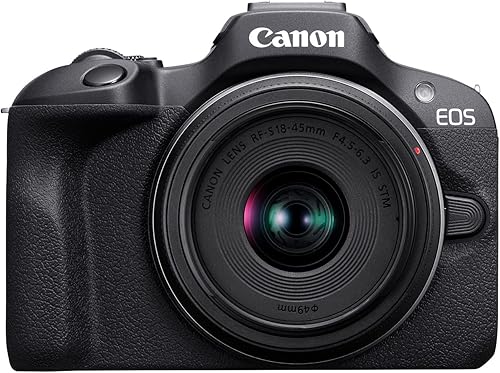
2. Canon EOS R50 Kit (RF-S 18-45mm)
Canon EOS R50 Kit (RF-S 18-45mm): Best for learning photography
- 24.2MP APS-C sensor
- 651 AF zones
- Vari-angle touchscreen
- 4K video up to 30 fps
A mirrorless starter kit for learning stills and video, with subject tracking and a screen that works for front-facing composition.
Pros
- People, animal and vehicle tracking
- Vari-angle touchscreen
- Bluetooth and Wi-Fi
Cons
- Additional lenses mean more gear decisions
- Kit zoom has limited reach for distant subjects
The R50 is the stronger match for beginners who want to learn photography and keep using the same camera as their interests grow. Its people, animal and vehicle tracking supports subjects that don't stay neatly in one place.
The vari-angle touchscreen helps with low viewpoints, overhead framing and recording yourself. Uncropped 4K up to 30 fps also makes this a useful choice when photos and video share the same priority.
Begin with automatic shooting and the included zoom, then learn how focus mode and shutter speed affect your results. Add exposure controls one at a time instead of trying to master every menu on the first day.
Skip it if you only want a pocket snapshot camera and don't want future lens decisions. Our guide to choosing a beginner mirrorless camera can help you decide whether that extra flexibility serves a real need.
3. Canon EOS R100 Kit (RF-S 18-45mm)
Canon EOS R100 Kit (RF-S 18-45mm): Best for photo-first learners
- 24.1MP APS-C sensor
- RF-S 18-45mm lens
- Human face and eye detection
- 4K video up to 24 fps
A compact interchangeable-lens starting point for still photography if you can work comfortably with a fixed rear screen.
Pros
- Compact, lightweight body
- Included standard zoom lens
- Human face and eye detection
Cons
- Fixed rear screen limits framing angles
- 4K uses the central sensor area
The R100 suits a photo-first learner who wants an interchangeable-lens starting point and can live with a fixed rear screen. Its compact, lightweight body and included standard zoom keep the first kit manageable.
Human face and eye detection helps when photographing people. The included lens also has optical stabilization, which helps reduce blur from hand movement when your subject is still.
For video, Full HD reaches 60 fps, while 4K uses the central sensor area at up to 24 fps. That narrower 4K view matters in small rooms because you may need more distance to fit yourself or a group into the frame.
Skip it for frequent self-recording or awkward camera angles, where screen movement becomes useful every day. Read our Canon R50 vs R100 comparison if those two bodies are your finalists.
4. Kodak PIXPRO FZ45
Kodak PIXPRO FZ45: Best for spare-battery travelers

- 16MP CMOS sensor
- 4x optical zoom
- 27mm wide-angle lens
- Runs on 2 AA batteries
A small everyday camera for travelers who prefer carrying replacement batteries to planning camera-charging stops.
Pros
- Uses replaceable AA alkaline batteries
- Optical zoom
- 1080p Full HD video
Cons
- Less zoom reach than the FZ55
- Depleted alkaline batteries need replacement
The FZ45 fits beginners who prefer replacing batteries to charging a camera during a trip. It uses 2 AA alkaline cells, so a spare pair can keep your plans moving when you don't have time for a charging stop.
Its small body, real buttons and attached zoom suit casual outings without extra lenses. The 4x optical zoom starts at a 27mm wide-angle view, useful for groups and scenes where you can't step farther back.
Carry fresh cells together and avoid mixing old and new batteries. For storage between trips, remove depleted batteries and follow the camera manual's guidance on battery handling.
Skip it if you want rechargeable convenience or distant-subject reach as your main feature. Our guide to compact cameras for travel helps weigh the value of a small camera against more specialized options.
5. Sony a6400 Kit (16-50mm)
Sony a6400 Kit (16-50mm): Best for moving family moments

- APS-C mirrorless body
- 16-50mm kit lens
- Eye autofocus
- Tilting LCD
An interchangeable-lens option for learning to photograph movement, with eye autofocus and burst shooting.
Pros
- Eye autofocus
- Up to 11 fps continuous shooting
- Tilting screen
Cons
- Kit zoom has limited reach for distant subjects
- Tilting screen offers different movement from a vari-angle screen
The a6400 suits beginners who want to learn moving-subject photography within an interchangeable-lens system. Eye autofocus and continuous shooting up to 11 fps give you useful tools for family activity and changing expressions.
The included 16-50mm zoom provides a starting range for everyday scenes. Its tilting LCD helps you compose from different heights, though its movement differs from the side-opening screen designs elsewhere in this group.
Use short bursts around an expected moment rather than holding the shutter through an entire event. Review the sequence for focus and subject movement, then adjust your approach before shooting another long run.
Skip it if your main need is distant wildlife with one attached lens, or if you want a specific front-facing screen arrangement. Picture your usual camera position before choosing a screen design, especially if you'll add accessories for video.
6. Kodak PIXPRO AZ255
Kodak PIXPRO AZ255: Best for distant vacation sights

- 25x optical zoom
- 24mm wide-angle lens
- Optical image stabilization
- Runs on AA batteries
A fixed-lens bridge camera for trips where you want wide views and distant details without changing lenses.
Pros
- Broad optical zoom range
- Optical image stabilization
- AA battery power
Cons
- Fixed lens limits future lens choices
- 1080p video rather than 4K
The AZ255 suits travelers who often spot something too far away for a basic compact zoom. Its 25x optical zoom starts at a 24mm wide-angle view, so one attached lens covers broad scenery and distant details.
Optical image stabilization helps reduce camera shake, particularly as the view gets tighter. It doesn't stop subject movement, so outdoor daylight is a better starting point than dim performances or fast action after sunset.
The camera runs on 4 AA batteries. Pack a complete spare set and practice finding a subject at the wide end before zooming in, especially when photographing something that moves.
Skip it if you mainly photograph nearby people and won't use the reach. Also choose a different format if your goal is experimenting with separate portrait, close-up or other specialist lenses later.
7. Canon PowerShot ELPH 360 HS
Canon PowerShot ELPH 360 HS: Best for sharing travel snapshots

- 20.2MP CMOS sensor
- 12x optical zoom
- Optical image stabilizer
- Built-in Wi-Fi
A slim travel camera for automatic shooting, longer zoom framing and wireless transfers to a compatible phone.
Pros
- 12x optical zoom
- Wi-Fi and NFC
- Hybrid Auto creates short day recaps
Cons
- No interchangeable lens system
- Automatic exposure offers less scope for learning exposure controls
The ELPH 360 HS suits travelers who want automatic shooting, useful zoom reach and phone sharing in a slim camera. Its 12x optical zoom gives you more framing range than the small Kodak compacts in this group.
Built-in Wi-Fi and NFC support transfers to a compatible smartphone. Set up the connection before a trip so pairing doesn't consume time when you want to share a photo.
Hybrid Auto records up to 4 seconds before each image and combines clips and stills into a recap. It's useful if you like short records of a day but don't want to edit individual clips yourself.
Skip it if learning exposure controls is a main goal, since its automatic exposure approach serves a different buyer. Choose it for convenience, and keep a file-copy routine rather than treating phone sharing as your only backup.
8. Kodak PIXPRO AZ528
Kodak PIXPRO AZ528: Best for distant wildlife

- 52x optical zoom
- Optical image stabilization
- 6 fps burst mode
- Built-in Wi-Fi
A bridge camera for beginners whose main need is framing distant subjects through one attached zoom lens.
Pros
- Longest zoom ratio in this group
- 6 fps burst mode
- Wi-Fi transfer and remote live view
Cons
- Fixed lens
- Full zoom takes practice to aim and hold steady
The AZ528 suits beginners whose main frustration is not getting a distant subject large enough in the frame. Its 52x optical zoom offers the longest zoom ratio here without requiring separate lenses.
Optical stabilization helps with hand movement, and 6 fps burst shooting gives you a sequence around a changing moment. Built-in Wi-Fi also supports photo transfer and remote live view through a compatible phone or tablet.
Learn the zoom gradually with stationary subjects before following wildlife. At longer settings, brace your elbows, support the camera and leave a little room around the subject so small movements don't push it outside the frame.
Skip it if most of your photos happen indoors or at close range. Extra reach won't solve poor light, and choosing this camera makes most sense when distant subjects are a regular part of your photography.
9. Nikon Z30 With Wide-Angle Zoom
Nikon Z30 With Wide-Angle Zoom: Best for beginner video creators
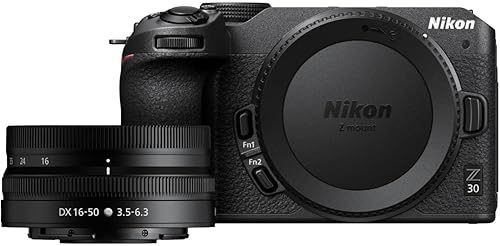
- 16-50mm wide-angle zoom lens
- Flip-out touchscreen
- 4K video
- Eye tracking for people and pets
A creator-focused kit for self-recording and streaming, with a front-facing screen and adjustable built-in microphone sensitivity.
Pros
- Flip-out touchscreen
- Eye tracking for people and pets
- USB-C webcam operation
Cons
- Additional lenses add gear decisions
- 4K streaming requires HDMI rather than USB-C
The Z30 suits beginners who spend more time speaking to a camera than photographing events. Its flip-out touchscreen, people and pet eye tracking, and adjustable stereo microphone sensitivity support self-recording.
The included 16-50mm VR lens gives you a starting zoom with optical stabilization. For a desk setup, USB-C supports Full HD 60p streaming and constant power, while 4K 30p streaming uses HDMI.
Before buying accessories, decide where you'll record and how the camera will connect. A tabletop tutorial, a walking clip and a regular desk stream create different needs for framing, support and sound.
Skip it if your main goal is a simple pocket camera or distant subjects through one attached zoom. Choose it when its video tools solve recurring needs, then build around those needs rather than buying a full creator kit immediately.
Compact or mirrorless: which beginner camera fits better?
Choose compact for fewer gear decisions and mirrorless for interchangeable lenses. A bridge camera fits the middle ground when you want a wide zoom range in one fixed-lens setup.
A small compact works well when carrying the camera is your biggest hurdle. A bridge camera suits someone who regularly frames distant sights, while a mirrorless kit lets you choose a different lens later.
Mirrorless doesn't require manual mode from day one. You can begin with automatic shooting, then learn focus and exposure controls as specific situations call for them.
Read whether compact cameras are worth it if you're deciding what a separate camera should add to your phone. Our guide to whether mirrorless cameras are good for beginners explains the learning path.
What should your first camera do well?
Your first camera should handle your most common subject and shooting conditions. Rank those needs before comparing sensor resolution or the largest number on a zoom badge.
Match focus and shutter speed to movement
For children, pets and sports, focus tracking and a fast enough shutter speed matter more than capturing a large pile of frames. Burst mode gives you choices around a moment, but focus still needs to land on the subject.
Stabilization addresses camera movement, not a person moving across the frame. If a child is blurred while the background looks sharp, a faster shutter speed or more light is the next thing to try.
Choose framing range for places you visit
Indoor groups call for a wide enough view, while wildlife and faraway details call for reach. Think about where you usually stand and whether you can move closer.
Zoom ratios describe the span between a lens's widest and longest settings. They don't tell you the starting angle, so consider the wide-angle specification alongside the zoom number.
Put screen movement and sharing in context
A front-facing screen is useful for self-recording, and an adjustable screen helps when the camera sits low or high. If you mostly shoot from a comfortable standing position, screen movement may be a lower priority.
Wireless sharing is convenient when you post during a trip. For large batches, copying files to a computer can be a more practical part of your routine.
Is a kit lens enough for a beginner?
Yes, use the included kit lens first unless you already know it can't handle your main subject. It lets you learn framing without spending time choosing a second lens.
Try its widest, middle and longest settings on the same scene. Then move your feet and notice how changing your position affects the relationship between a nearby subject and the background.
Keep a short note whenever you can't make the photo you want. Repeated needs, such as wider indoor framing or more distant reach, give you a sound reason for another lens.
Our guide to whether a kit lens is good enough helps turn those limits into a useful next step.
How should you set up a beginner camera before the first outing?
Start with power, storage and a familiar automatic mode. Get comfortable taking and saving photos before exploring every setting.
- Prepare the battery. Follow the camera's charging instructions or install the correct fresh cells, then attach the strap securely.
- Choose a compatible memory card. Check the required type, capacity and video speed requirements for your exact camera and recording mode.
- Set the date and time. Correct timestamps help keep photos from different outings in order.
- Format the card in the camera. Copy any existing files first because formatting erases them.
- Start with automatic exposure. For people, enable face or eye detection where available and check that focus lands on the intended person.
- Make a few practice photos and a short clip. Review them closely, then copy them to your usual computer or phone.
JPEG is a simple starting point for sharing. If your chosen camera supports RAW, add it when you want more editing control and have a plan for the larger files.
R50 buyers can use our Canon R50 memory card guide to choose storage. Set up any phone connection at home before relying on it during an outing.
Which beginner mistakes are easiest to avoid?
The most useful early habit is checking why a photo failed before changing equipment. Many missed photos come from focus placement, movement, light or framing.
- Chasing megapixels: More pixels don't correct missed focus or motion blur.
- Using maximum zoom immediately: Start wider, locate the subject and tighten the frame gradually.
- Standing too close for group photos: Leave room at the edges and check that everyone fits before pressing the shutter.
- Choosing 4K for every clip: Higher resolution adds storage and editing demands, so use it when you have a reason.
- Changing several settings at once: Make one change, take another photo and compare the result.
- Buying extra lenses too soon: Learn the included lens before deciding which limitation needs solving.
Review images at a closer view rather than judging sharpness from a small preview. Check eyes in portraits and moving parts in action photos to separate missed focus from subject blur.
For everyday practice, choose one subject near a window or outdoors in open shade. Change your position and framing first, then introduce one camera setting at a time.
How do you care for a first camera and protect your photos?
Protect the camera from grit, moisture and rough handling, and keep separate copies of important photos. A short routine after each outing prevents avoidable problems.
Brush or blow loose dust away before wiping a lens with a clean lens cloth. Avoid rubbing sand across the glass, and don't use clothing that may carry grit.
Turn the camera off before changing lenses and work away from wind or blowing dust. Keep the lens mount open only as long as needed, with caps ready for the removed parts.
Let a cold camera warm gradually inside its bag when entering a warm room. Keep drinks and loose batteries away from the camera compartment, and don't assume a camera can handle rain without checking its manual.
Copy photos after an outing and keep another copy before clearing the card. Our guide to traveling with a camera covers carrying and protecting gear away from home.
Which best beginner camera under 1000 fits your plans?
Choose the FZ55 if you'll use a small snapshot camera more often than a larger kit. Pick the R50 if learning photography and using different lenses are the reasons you're buying.
Choose the R100 for a photo-first path with a fixed screen, or the a6400 if eye autofocus and learning to capture movement fit your plans. The Z30 makes more sense when self-recording and streaming lead the decision.
For an attached lens, pick the FZ45 for replaceable batteries, the ELPH 360 HS for slim travel carry and sharing, or an AZ255 or AZ528 when distant framing is a regular need.
The best beginner camera under 1000 dollars should leave you with a usable kit and a reason to take it out. Use our best beginner camera guide if you still need to settle on the camera type before choosing a model.
Our top 3 picks at a glance
-
1
-
2
-
3
Frequently asked questions
What is the best beginner camera under 1,000 dollars?
The Kodak PIXPRO FZ55 is our choice for simple snapshots, while the Canon EOS R50 kit better suits someone who wants to learn photography with interchangeable lenses. Choose between those goals first, then check the complete kit cost, including a compatible memory card and any power accessories you need.
Should a beginner choose a compact or mirrorless camera?
Choose a compact for an attached lens and fewer gear decisions, or mirrorless for interchangeable lenses and room to learn exposure controls; carry habits matter too: a camera you leave behind won't help you practice. Our guide to what a mirrorless camera is explains the main differences.
Are kit lenses useful for beginners?
Yes, a kit lens is a useful starting point for everyday scenes, portraits and learning framing; use it until you can name a recurring limitation, such as not fitting a room into the frame or not reaching distant subjects. Read what a kit lens does before adding another lens.
Is a long zoom camera easier for beginners?
A long zoom makes distant framing possible without lens changes, but keeping a small subject in view takes practice; start wide, find your subject and zoom in gradually. Stabilization helps with camera shake, but it doesn't freeze a running child or flying bird, so light and shutter speed still matter.
How do you choose a first camera?
Choose around the photos or videos you make most often, then consider how much gear you'll carry; decide between simple snapshots, learning photography, distant subjects and self-recording before comparing specifications. For a broader shortlist, see our best cameras for family photos and travel guide.


